> For the complete documentation index, see [llms.txt](https://docs.bless.net/llms.txt). Markdown versions of documentation pages are available by appending `.md` to page URLs; this page is available as [Markdown](https://docs.bless.net/blessnet-apps/attestations.md).
# Attestations
Prove things.
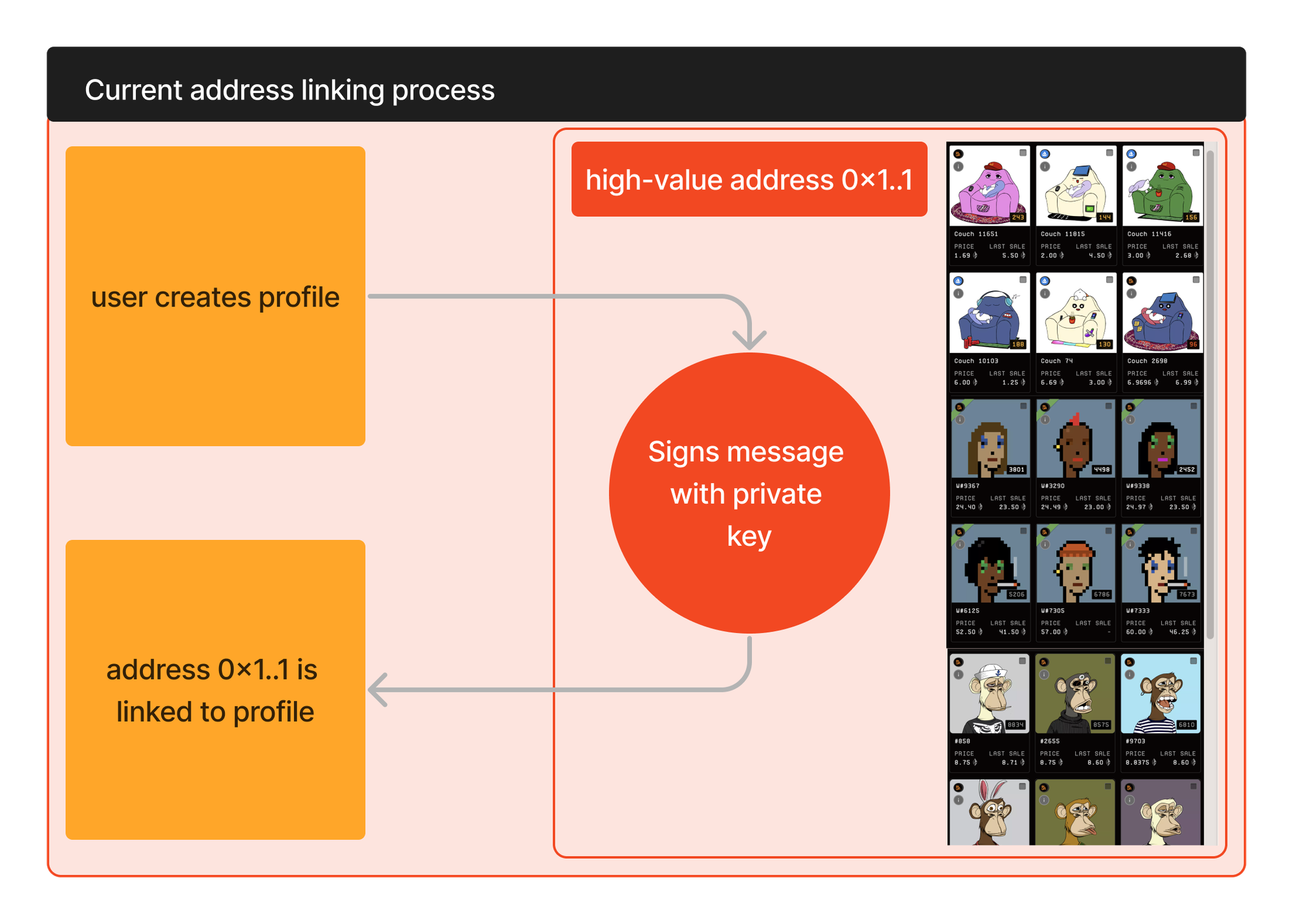
A number of popular protocols require users to link their asset holding wallets with their off-chain accounts. There are various ways to achieve this, with one common way being having the user sign a message with the private key for the address that holds the assets.
Users can be reluctant to do this. Often high-value assets will be in cold wallets that cautious users do not ‘put live’ unless under exceptional circumstances. Further to that, some users have a personal policy to not sign arbitrary messages.
Users need to sign a message for each address they wish to link.
Legacy Linking
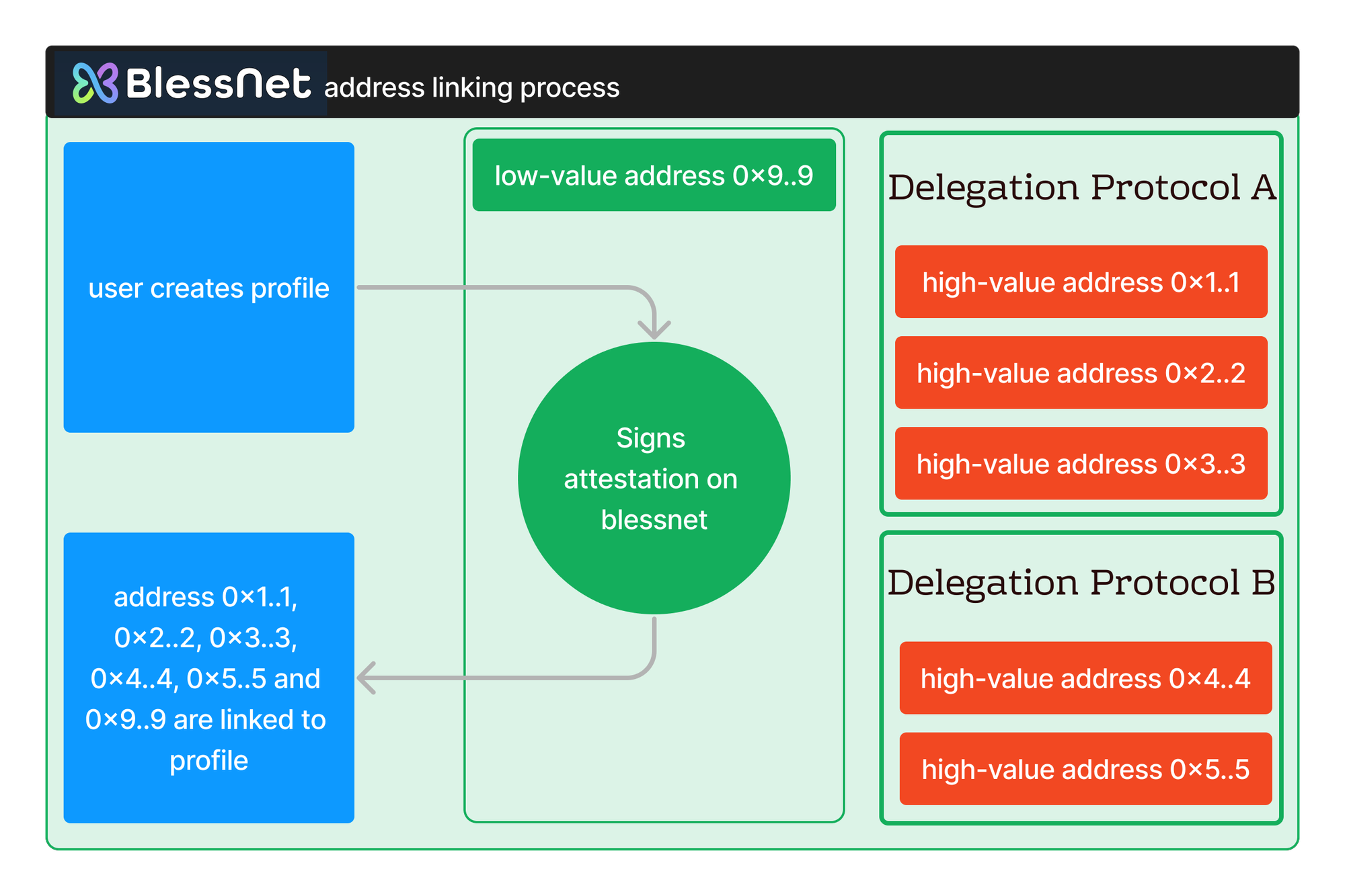
To link an address using Blessnet the user makes an attestation transaction on Blessnet mainnet. The user does not need to use the private key for the wallet with high-value assets. Rather they can use any address that has a link to their high-value address on popular delegation protocols.
The Blessnet attestation transaction proves that the user is authorised to link all of the addresses that are associated with the attestation address. This allows the user to link many addresses with a single transaction.
Blessnet Linking with Attestations
## Implementation
### Overview
An integration with blessnet attestations is as simple as swapping out the code that currently calls for a signed message from a given address and replacing it with a call to the `attest()` method on the blessnet attestation contract. The `attest()` method will return an array with all addresses which the calling address can attest for (including itself).
The `attest()` method must be passed an array of addresses that the calling address can make an attestation for. You can think of this as all the addresses that have delegated to this address on a range of protocols.
Blessnet provides an [API endpoint ](/blessnet-api/addresses-address-vaults.md)that returns this array for a given address. You then just pass this address as the argument on the `attest()` call.
The `attest()` method will return an array with all addresses it has been passed that are **valid**. It will **not** pass back any addresses that are not a valid attestation.
If **none** of the addresses it has been passed are valid attestations it will revert (although as you will be passing the address's own address as one of the entries this should never be the case).
Now you can iterate through the array of returned addresses and link them all with the user’s profile.
Note - users will need to make the `attest()` call on blessnet, which is it’s own chain. This will require them to have a very (very) small balance of BLESS, blessnet’s native token.
### Step by Step
Below is a step by step implementation for an example application.
This example application has a users that has created an account id (@omnus). The user has a connected hot wallet (omnus.eth).
The application uses a Blessnet Attestation to associate @omnus with every Ethereum address that omnus.eth is allowed to represent.
#### Step One
Get all of the addresses that omnus.eth is allowed to represent. Blessnet aggregates delegation data from a number of popular protocols and provides this on an API endpoint. Make a request to [vaults](/blessnet-api/addresses-address-vaults.md) passing the connected address (the address for omnus.eth). Note that ENS addresses are not, yet, supported on the API call.
#### Step Two
Attestations are made on Blessnet. The user will need to add the Blessnet chain and switch to it in order to submit the Attestation transaction.
Your wallet provider will likely provide methods for both of these actions (for example [this approach for Metamask](https://docs.metamask.io/wallet/reference/wallet_addethereumchain/)). The chain details for Blessnet can be found in the [Blessnet Chain Details](/reference/blessnet-chain-details.md) section.
{% hint style="info" %}
Your users will need BLESS token for gas to make the Attestation call. \
\
Blessnet is delighted to support early adopters. We can offer automatically delivered BLESS to your users to support a smooth Attestation process. \
\
Please see the [BLESS Sprinkler](/bless-token/bless-sprinkler.md) section for more information.
{% endhint %}
#### Step Three
From step one you have an array of all addresses that omnus.eth can represent. This includes its own address and any valid delegations.
Now form a call to the `attest()` method on Blessnet, passing in the user's address and the array of addresses that omnus.eth can represent.
For details of the Attestation contract address please see the [Reference section](/reference/contract-addresses.md#attestations).
The Attesation [contract ABI is also available](/contract-abi/attestions.sol.md).
The `attest()` method takes the following arguments:
attestationTypeId_ | uint96
This type ID signifies the type of attestation being made. **Anyone** can add attestation types to Blessnet. The ID is a sequential number, with users adding types able to specify text, a URI and bytes parameter for each type.
For example, you may want to be able to easily identify a group of assetations and link them with a label. You create the attestation type, are assigned type ID 983, and use that when submitting your users attestations.
See [Adding Attestation Types](#adding-attestation-types) for more details.
If you don't have a specifc ID you can pass 0.
attestedFor_ | address[]
This is the array of addresses that the calling address is attesting for.
Pass in the array of addresses from step one.
attestationString_ | string
Any arbitrary string that you want to store with the attestation. Is emitted.
attestationBytes_ | bytes
Any arbitrary bytes that you want to store with the attestation. Is emitted.
attestationTarget _ | bytes32
Any arbitrary bytes32 that you want to store with the attestation. Is emitted.
**Example call**:
```solidity
attest(0, [0x1234..5678, 0x4321..8765], "JayLtd signup", 0x, 0x000..00)
```
#### Step Four
The Attestation transaction emits the valid delegates for the caller address, together with the arbitrary data you provided on the call (string, bytes and bytes32).
You can wait for the transaction to complete, read the event from the log, and add the valid links. Alternatively you can have a asynchronous watch for all new events that match your attestation type, loading the links as new events are emitted.
## Adding Attestation Types
**Anyone** can add attestation types to Blessnet. The ID is a sequential number. Users can specify text, a URI and bytes parameter for each type.
If you need to identify a particular type of attestation please feel free to add one to Blessnet.
For example, you may want to be able to easily identify a group of assetations and link them with a label. You create the attestation type, are assigned type ID 983, and use that when submitting your users attestations.
Bear in mind that anyone can submit an attestation of any type.
To add an Attestation Type please see `addAssetationType()` in the [contract ABI,](/contract-abi/attestions.sol.md) or visit the contract on scan.bless.net (sepolia-scan.bless.net for sepolia).