# Welcome to Blessnet

Welcome to the Blessnet documentation. Here you'll get an overview of the unique features of Blessnet and the technical details you need to start interacting with the chain.

Do you have a question that isn't answered here?  Please reach out on our socials. These are living documents and we add to them regularly.

### Jump right in

<table data-view="cards"><thead><tr><th></th><th></th><th data-hidden data-card-cover data-type="files"></th><th data-hidden></th><th data-hidden data-card-target data-type="content-ref"></th></tr></thead><tbody><tr><td><strong>Getting Started</strong></td><td>The quickstart guide!</td><td><a href="https://1707492302-files.gitbook.io/~/files/v0/b/gitbook-x-prod.appspot.com/o/spaces%2FXVbuZBFM6YbDqM0Dd1vM%2Fuploads%2Fem6xpfegQlZ6ozneTW9i%2FGroup%202%20(3).png?alt=media&amp;token=1dbe8347-2d80-465f-961a-70b40eb78dfd">Group 2 (3).png</a></td><td></td><td><a href="/getting-started/quickstart">Quickstart</a></td></tr><tr><td><strong>References</strong></td><td>Chain info and addresses</td><td><a href="https://1707492302-files.gitbook.io/~/files/v0/b/gitbook-x-prod.appspot.com/o/spaces%2FXVbuZBFM6YbDqM0Dd1vM%2Fuploads%2FqFapy7tmQs1cWFth8wMK%2FGroup%203%20(3).png?alt=media&amp;token=c1ab46a3-fe13-41ea-9f8a-cc2deefab5ed">Group 3 (3).png</a></td><td></td><td><a href="/reference/blessnet-chain-details">Reference</a></td></tr><tr><td><strong>Whitepaper</strong></td><td>Our mission and features</td><td><a href="https://1707492302-files.gitbook.io/~/files/v0/b/gitbook-x-prod.appspot.com/o/spaces%2FXVbuZBFM6YbDqM0Dd1vM%2Fuploads%2F0HAqLaQZ0HXnHdwvAN4v%2FGroup%204%20(1).png?alt=media&amp;token=b4fd780e-697c-4743-a935-9ef8514a363e">Group 4 (1).png</a></td><td></td><td><a href="/papers-and-articles/whitepaper">Whitepaper</a></td></tr></tbody></table>


# Quickstart

Want to get going with Blessnet ASAP? You are in the right place!

<figure><img src="https://1707492302-files.gitbook.io/~/files/v0/b/gitbook-x-prod.appspot.com/o/spaces%2FXVbuZBFM6YbDqM0Dd1vM%2Fuploads%2FAN2xTVA7xyJkWNhgLf4P%2Fimage.png?alt=media&amp;token=ce549254-a688-48cb-b623-02636cb00da7" alt=""><figcaption></figcaption></figure>

{% hint style="info" %}
Looking for on-chain reference data, like supported chains and contract addresses? Head to the [Reference](https://github.com/GitbookIO/onboarding-template/blob/main/getting-started/broken-reference/README.md) section to learn more.
{% endhint %}

### Add Blessnet to your Wallet

An easy way to add Blessnet chains to your wallet is through chainlist.org. Follow the below link, connect your wallet, and then select the option to add then chain (either Blessnet or Blessnet Sepolia):

{% embed url="<https://chainlist.org/?chain=1&search=blessnet>" %}
Blessnet on chainlist.org
{% endembed %}

If you could prefer to add the Blessnet network manually please see the required information in [Blessnet Chain Details](/reference/blessnet-chain-details).

## Get some BLESS token

BLESS is the native token for Blessnet. It is also available as a self-bridging ERC20 on a range of Ethereum chains. For full details on BLESS see the [BLESS token section](/bless-token/bless).

You can get Sepolia BLESS from the [Sepolia faucet](/bless-token/get-bless#sepolia).

Mainnet BLESS can be purchased from [BLESS token machine](/bless-token/get-bless#mainnet) available on a number of chains.

## Key Apps

The following apps are useful to help you on your journey into Blessnet:

### The Blessnet Homepage

{% embed url="<https://bless.net>" %}

### The Blessnet Block Scan

#### Mainnet

{% embed url="<https://scan.bless.net>" %}
Blessnet Mainnet Scan
{% endembed %}

#### Testnet

{% embed url="<https://sepolia-scan.bless.net>" %}
Blessnet Sepolia Scan
{% endembed %}

### The BLESS Bridge

#### Mainnet

{% embed url="<https://bridge.bless.net>" %}
BLESS Mainnet Bridge
{% endembed %}

#### Testnet

{% embed url="<https://sepolia-bridge.bless.net>" %}
BLESS Sepolia Bridge
{% endembed %}

## Get the Full Summary!

For a full summary of Blessnets mission and features please read our [Whitepaper](/papers-and-articles/whitepaper). It provides a summary of all the key aspects of Blessnet, which are then expanded in the associated section of this documentation.


# Blessnet Chain Details

Add Blessnet to your wallet.

<figure><img src="https://1707492302-files.gitbook.io/~/files/v0/b/gitbook-x-prod.appspot.com/o/spaces%2FXVbuZBFM6YbDqM0Dd1vM%2Fuploads%2Fx9wDgkyqmaifj1ma7tpf%2Fimage.png?alt=media&amp;token=e738a3d0-4e69-4fd3-ae54-2b520caeef88" alt=""><figcaption></figcaption></figure>

## Blessnet Mainnet

* Network name: Blessnet
* New RPC URL: <https://blessnet.calderachain.xyz/http>
* Chain ID: 45513
* Currency Symbol: BLESS
* Block Explorer: <https://scan.bless.net>

## Blessnet Sepolia

* Network name: Blessnet Sepolia
* New RPC URL: <https://blessnet-sepolia-testnet.rpc.caldera.xyz/http>
* Chain ID: 11145513
* Currency Symbol: BLESS
* Block Explorer: <https://sepolia.scan.bless.net>


# Supported Chains

A quick reference of what chains are supported across Blessnet's Apps

<figure><img src="https://1707492302-files.gitbook.io/~/files/v0/b/gitbook-x-prod.appspot.com/o/spaces%2FXVbuZBFM6YbDqM0Dd1vM%2Fuploads%2Fy4MK6haeY1bMIMGbyNR7%2Fimage.png?alt=media&amp;token=7a8134c4-f439-4e74-967d-e385f97fcc31" alt=""><figcaption></figcaption></figure>

By design Blessnet can support cross-chain interaction with any chain. Only Ethereum (EVM) chains are currently supported. Detailed below are the supported chains for Blessnet's services

## BLESS

BLESS, Blessnet's gas token, is natively multi-chain. See the BLESS section for more details on BLESS.

BLESS is currently supported on the following chains.

### Mainnets&#x20;

| **Chain**        | **Native Chain Id** | **Wormhole Chain Id** |
| ---------------- | ------------------- | --------------------- |
| ETH Mainnet      | 1                   | 2                     |
| Arbitrum One     | 42161               | 23                    |
| Optimism Mainnet | 10                  | 24                    |
| Base Mainnet     | 8453                | 30                    |
| Polygon Mainnet  | 137                 | 5                     |
| Blast Mainnet    | 81457               | 36                    |

### Testnets

| **Chain**        | **Native Chain Id** | **Wormhole Chain Id** |
| ---------------- | ------------------- | --------------------- |
| ETH Sepolia      | 11155111            | 10002                 |
| Arbitrum Sepolia | 421614              | 10003                 |
| Optimism Sepolia | 11155420            | 10005                 |
| Base Sepolia     | 84532               | 10004                 |

## Mirrors and Ethereals

Mirrors and Ethereals bring other chain data to Blessnet in real-time. See the Data Aggregation section for more details on Mirrors and Ethereals.

Mirrors are currently supported on the following chains.

### Mainnets

| **Chain**    | **Native Chain Id** | **Wormhole Chain Id** |
| ------------ | ------------------- | --------------------- |
| ETH Mainnet  | 1                   | 2                     |
| Arbitrum One | 42161               | 23                    |

### TestNets

| **Chain**        | **Native Chain Id** | **Wormhole Chain Id** |
| ---------------- | ------------------- | --------------------- |
| ETH Sepolia      | 11155111            | 10002                 |
| Arbitrum Sepolia | 421614              | 10003                 |

## Attestations

Attestations allow users to attest ***anything*** using their EVM address. You can use this in workflows to - for example - allow users to prove control of addresses without using the chain they hold assets on or arbitrary signatures. See the Attestations section for more details.

Attestations take place on Blessnet. The information that they prove can be used on **any** chain.

## Transaction Pool

The Blessnet Transaction Pool allows transactions to originate on Blessnet and settle on other chains. This can be used for many purposes, for example claiming or minting assets on other chains as a result of interactions with Blessnet. For more details see the Transaction Pool section.

Transaction Pool is currently supported on the following chains.

### Mainnets

| **Chain**        | **Native Chain Id** | **Wormhole Chain Id** |
| ---------------- | ------------------- | --------------------- |
| ETH Mainnet      | 1                   | 2                     |
| Arbitrum One     | 42161               | 23                    |
| Optimism Mainnet | 10                  | 24                    |
| Base Mainnet     | 8453                | 30                    |
| Polygon Mainnet  | 137                 | 5                     |
| Blast Mainnet    | 81457               | 36                    |

### Testnets

| **Chain**        | **Native Chain Id** | **Wormhole Chain Id** |
| ---------------- | ------------------- | --------------------- |
| ETH Sepolia      | 11155111            | 10002                 |
| Arbitrum Sepolia | 421614              | 10003                 |
| Optimism Sepolia | 11155420            | 10005                 |
| Base Sepolia     | 84532               | 10004                 |


# Contract Addresses

A quick reference of the contract addresses for Blessnet's Apps.

<figure><img src="https://1707492302-files.gitbook.io/~/files/v0/b/gitbook-x-prod.appspot.com/o/spaces%2FXVbuZBFM6YbDqM0Dd1vM%2Fuploads%2F90A3GbUwtEt9ulevoQTd%2Fimage.png?alt=media&amp;token=78f6535e-7902-4474-ac3a-ed8ce3c9f71c" alt=""><figcaption></figcaption></figure>

## :green\_square: $BLESS Token

### All Mainnets

```
0x000000000000CCA70B6e0997a94681a3114EdDD7
```

See [supported chains](/reference/supported-chains#mainnets).

#### Router

Rotuer contract dedicated to parent -> child transfers

```
0x00000000001fc9d4DdE926c7016409c5eeAa0644
```

### All Testnets

```
0x0000000000BBfbab0236d05c06211853f812ec57
```

See [supported chains](/reference/supported-chains#testnets).

#### Router

Rotuer contract dedicated to parent -> child transfers

```
0x0000000000158AB33172239922407A4385cC2f13
```

## :green\_square: $BLESS Dispenser

### Mainnet Dispenser

```
0x000000000000a21db7945Fc6A9d9DEfd60358FE6
```

### Testnet Dispenser

```
0x00000000000b81Bb120756126eafC0b731B416c6
```

## :green\_square: Access Controller

The Access Controller is an **upgradable contract**.

Below is both the address of the contract and it's current implementation address. The implementation address is the code that will execute in association with the state at the contract address.

For more information on upgradeable contracts see this [handy article from Chainlink.](https://blog.chain.link/upgradable-smart-contracts/)

### Mainnet and Testnet

```
Address:        0x00000000004aE214DFD56298B11D0F3b301fF729
Implementation: 0x0000000000AE0e2329A3242DC4F95DC48CDD4b82
```

## :green\_square: Attestations

### Mainnet and Testnet

```
0x0000000000bD5b5f25fBB90AF0188c1070d159A1
```

## :green\_square: Blessed Accounts (ERC-4337)

### Mainnet and Testnet&#x20;

#### Entry Point

```
0x0000000000160d2F18960e14a6626eDEcBd16121
```

#### Account Factory

```
0x0000000000006C04E4D22125B7cDd6C2d14a90c1
```

## :green\_square: Delivery Service

### Mainnet Relay

```
0x38d62E7009752C9E04Cb26A81f53Fa5162aC3A4F
```

### Testnet Relay

```
0x60663d378491A4C050f65aA4f693A5E01458afAD
```

## :green\_square: Ethereal 721 Factory

### Mainnet

```
0x00000000006c4E67F7C441b6Ff95a1302E0d5740
```

### Testnet

```
0x00000000005a4763D1fe68ebF4b6601E6C129dDf
```

## :green\_square: **Permissions**

### Permissions Controller

#### Mainnet and Testnet

```
0x0000000000b830264AC5E8004250e1f7003D6A68
```

### Modular Permissions

#### Mainnet and Testnet

```
0x0000000000ac1B1A0028a42DeF73f79F561d6123
```

### **Mirrors**

#### **Mainnet**

```
delegate.xyz v1:    0x5ae52f3f1748d839359c9B0346b06c41EFC34FfE
delegate.xyz v2:    0x9FC809895685a29c8443C3908105042F986c3961
eps v1:             0x512e7C901Df84Ca275f846718e53dCfe34cF64E8
eps v2:             0x6E75B4D9a6d56aFadB728BdC00eD8930BF0D1a50
```

#### Testnet

```
delegate.xyz v1:    0x6324cfDD16935Bd6900CE10D1d8130dbADF74D5A
delegate.xyz v2:    0x0D888Be987245fB198884519F515D090733118E7
```

## :green\_square: Ping

### Mainnet and Testnet

```
0x00000000000A6B6E3F60B9D61a21233C8A09a2CB
```

## :green\_square: Price Feed

### Mainnets and Testnets

```
0x0000000000019B6e29d82aBBE0d9686Ad63FB2bB
```

## :green\_square: Sprinkler

### Mainnet and Testnet

```
0x0000000000E506F61d4c3aEFc7C1Cf2Eef7C4aD9
```

## :green\_square: Token Bridge

### &#x20;Mainnets Token Gateway

```
0x0000000000001Deb2E653D32C2e557A96cE2b91D
```

### &#x20;Mainnets Token Templates

```
ERC20:   0x2de02277952294279D812b90C28A64633d14d3AA
ERC721:  0xCEdF54063c523ACF186821928006d10dB73B341F
ERC1155: 0x9355b04e5Ec4A6eF180B10AC4E65dC758DDD207c
```

### &#x20;Testnets Token Gateway

```
0x000000000000d79998630389a33119953E647646
```

### &#x20;Testnets Token Templates

<pre><code><strong>ERC20:   0x53Ccf8839c95E743679B4A8d39d210f517Cfc1DC
</strong>ERC721:  0xAc0A1eed178e93732036f71F510dc4787F9fbDFe
ERC1155: 0x0666586feBC3c5F89008bd36bb6cbb0CADa7Dd81
</code></pre>

## :green\_square: Transaction Bridge

### Mainnets Transaction Gateway

```
0x000000000000a5F95dC354b923a50f9b50c2DEca
```

### Testnets Transaction Gateway

```
0x00000000000063000B7bd997C89951cCe2728E76
```


# BLESS

Details on BLESS, our native gas token and multi-chain ERC20

<figure><img src="https://1707492302-files.gitbook.io/~/files/v0/b/gitbook-x-prod.appspot.com/o/spaces%2FXVbuZBFM6YbDqM0Dd1vM%2Fuploads%2FEWcFpx6wAFBRZnWRJU5N%2Fimage.png?alt=media&amp;token=b56e05ad-0b19-4104-aceb-c8f767fe778e" alt=""><figcaption></figcaption></figure>

## Key Features

BLESS has some striking features, including being:

* Natively MultiChain
* Governance enabled
* Native token on Blessnet, an ERC20 on other chains
* Single, consistent, contract address on all chains
* Able to self-bridge from any supported EVM chain to any supported EVM chain
* Able to self-bridge from any supported EVM chain directly to Blessnet
* Able to self-bridge from Blessnet to any supported EVM chain

## Distribution

BLESS is the native gas token of Blessnet. It has a fixed supply of 1 billion tokens.

All tokens have been minted. There is currently no vesting or emissions schedule. For details on how to get BLESS please see the [Get BLESS section](/bless-token/get-bless).

## BLESS is Built to be Used

BLESS is built to be used, both as a gas token for Blessnet transactions and as forwarded native token for delivering transactions to other chains.

BLESS is used to pay gas for transactions on Blessnet. Unless you are planning to do transactions on Blessnet there is no reason for you to hold BLESS. Gas costs on Blessnet are very very low, particularly for transactions that stay on Blessnet and don't settle on other chains. **You don't need much BLESS**.

## Single Contract Address

The BLESS ERC20 is deployed using the CREATE2 opcode to supported chains, meaning that it has the same contract address no matter where you as using it. You don’t have to remember an endless list of contract addresses that vary between chains.

On Mainnets the BLESS contract address is **`0x000000000000CCA70B6e0997a94681a3114EdDD7`**

On Testnets the BLESS contract address is **`0x0000000000BBfbab0236d05c06211853f812ec57`**

The BLESS self-bridging ERC20 token is currently supported on the following chains:

* Ethereum Mainnet
* Arbitrum Mainnet
* Optimism Mainnet
* Base Mainnet
* Polygon Mainnet
* Blast Mainnet
* Ethereum Sepolia
* Arbitrum Sepolia
* Optimism Sepolia
* Base Sepolia


# Get BLESS

How to get BLESS token for both Mainnet and Sepolia.

<figure><img src="https://1707492302-files.gitbook.io/~/files/v0/b/gitbook-x-prod.appspot.com/o/spaces%2FXVbuZBFM6YbDqM0Dd1vM%2Fuploads%2Fa1hcPUpMHUuUC0hNVWV2%2Fimage.png?alt=media&amp;token=8ad1113e-dd3e-464d-a820-79d7366ae8a7" alt=""><figcaption></figcaption></figure>

BLESS is a native gas token on Blessnet and an ERC20 on other chains. You can get BLESS in a number of ways, including the below.

## Mainnet

The [BLESS Token Machine](/bless-token/bless-dispenser) can be used to purchase BLESS on a number of chains, including Ethereum Mainnet, Arbitrum, Optimism and Base.

## Sepolia

The BLESS Sepolia faucet will emit 0.01 BLESS a day to eligible addresses. Visit the fauct at \<tbc>.


# BLESS Sepolia Faucet

Access free BLESS on the Sepolia network.

<figure><img src="https://1707492302-files.gitbook.io/~/files/v0/b/gitbook-x-prod.appspot.com/o/spaces%2FXVbuZBFM6YbDqM0Dd1vM%2Fuploads%2FqitfKp8rDgSk5wD6mL8v%2Fimage.png?alt=media&amp;token=a5f02913-46d0-4968-9647-137fbca77bce" alt=""><figcaption></figcaption></figure>


# BLESS Sprinkler

Request a sprinkle of BLESS for your users...

<figure><img src="https://1707492302-files.gitbook.io/~/files/v0/b/gitbook-x-prod.appspot.com/o/spaces%2FXVbuZBFM6YbDqM0Dd1vM%2Fuploads%2FUmBsty9I6S7shtXQpP5J%2FGroup%207%20(1).png?alt=media&amp;token=b22ac8d0-6372-4e48-9a55-a6f83eb235fa" alt=""><figcaption></figcaption></figure>

Transactions on Blessnet are very cheap, but you do need *some* BLESS for gas. We've made it easy for you to request a small BLESS balance for users wanting to benefit from Blessnet's features.

A sprinkle of BLESS can be requested from the[ sprinkles API endpoint](/blessnet-api/sprinkles). To use this endpoint you will need an API key, specifically one that has been setup to allow airdrops. Please contact us to arrange a key.

The amount of BLESS delivered per sprinkle is controlled by the Bless Sprinkler contract. This is currently set to **0.1 BLESS**. For transactions that take place solely on Blessnet (for example [Attestations](/blessnet-apps/attestations)) this amount of BLESS should last a long time.

There is also a maximum amount of BLESS that can be sprinkled to each address per API key origin. This is currently also set to **0.1 BLESS**, meaning that you can make one request per address per key.


# BLESS Dispenser

An easy way to get BLESS

<figure><img src="https://1707492302-files.gitbook.io/~/files/v0/b/gitbook-x-prod.appspot.com/o/spaces%2FXVbuZBFM6YbDqM0Dd1vM%2Fuploads%2FC9VT1V7PhdtmULrbPHOY%2Fimage.png?alt=media&amp;token=7313187e-7c2c-4a28-b141-50ff4a06c056" alt=""><figcaption></figcaption></figure>

Blessnet is a chain for ***doing*** thing, and it's BLESS that lets you get things done. You're never likely to need much BLESS, but for native gas on Blessnet you do need some.

The BLESS Dispenser is a convenient way to get BLESS from a number of chains.&#x20;

When using the BLESS Dispenser you chose the chain you want BLESS on. Bless delivered to **Blessnet** will be arrive as native chain token. Bless delivered to other chains will arrive as an ERC20 self-bridging token. You can send this BLESS to any supported chains using the [BLESS Bridge](/bless-token/bless-bridge).

The default option is to have BLESS delivered to Blessnet, as it is assumed you are getting BLESS for gas fees as you want to do something interesting and exciting on Blessnet!&#x20;

The BLESS Dispenser is easy to use. On all chains BLESS is priced against the native gas token for that chain, which in most cases is ETH. Enter the amount of BLESS you want to buy and the native gas token amount will update. Remember to change the delivery option if you want BLESS delivered to your current chain and not to Blessnet.

Deliveries take a minute or less.


# BLESS Bridge

The easiest way to bridge BLESS is with the BLESS bridge.

<figure><img src="https://1707492302-files.gitbook.io/~/files/v0/b/gitbook-x-prod.appspot.com/o/spaces%2FXVbuZBFM6YbDqM0Dd1vM%2Fuploads%2FGGk1RzFB6qXJqDRn62Ru%2Fimage.png?alt=media&amp;token=8e8c20ea-bf81-4270-af27-153db739a1cd" alt=""><figcaption></figcaption></figure>

## Natively Multi-chain

Blessnet aims to support the entire Ethereum ecosystem. In reflection of that BLESS is natively multi-chain.

On Blessnet BLESS operates as a standard gas token. When not on Blessnet BLESS is an ERC20 token with cross-chain technology baked in. The token contract includes self-bridging methods that leverage Wormhole and the Arbitrum Nitro rollup bridge. This allows BLESS to bridge **itself** between supported chains.

BLESS bridging consists of three possible flows, as illustrated below.

### Bridge Flow One: Non-Child and Non-Parent Origin

In network terms Blessnet is a child chain of Arbitrum, which is it's parent. If the origin of the bridge is neither the child or parent (Blessnet or Arbitrum) we use Bridge Flow One.

BLESS self-bridging for flow One involves a `selfBridgeOut()` call that uses the Wormhole standard relayer to send the bridge message between chains.

If the final destination of the BLESS is Blessnet this is then followed by a call on the native rollup bridge to deliver the native BLESS to Blessnet.

<figure><img src="https://1707492302-files.gitbook.io/~/files/v0/b/gitbook-x-prod.appspot.com/o/spaces%2FXVbuZBFM6YbDqM0Dd1vM%2Fuploads%2F8EgQskFfZUj1GaVJ8MqI%2FBless%20bridge%20flow%201.png?alt=media&amp;token=e6165ec6-d9d8-4d3e-9787-4538926833f0" alt=""><figcaption><p>Bridge Flow One</p></figcaption></figure>

### Bridge Flow Two: Parent Origin

When the origin is the parent chain (Arbitrum), there are two paths:

* To the child (Blessnet) using the native rollup bridge.
* To other chains using the Wormhole standard relayer.

<figure><img src="https://1707492302-files.gitbook.io/~/files/v0/b/gitbook-x-prod.appspot.com/o/spaces%2FXVbuZBFM6YbDqM0Dd1vM%2Fuploads%2FgVAhwuiTcu9OR2Hk6Kjn%2FBless%20bridge%20flow%202.png?alt=media&amp;token=fe5c0053-5401-4a05-86d0-3e6ad1225655" alt=""><figcaption><p>Bridge Flow Two</p></figcaption></figure>

### Bridge Flow Three: Child Origin

When the origin is the child chain (Blessnet) there are two paths:

* To the parent (Arbitrum) using the native rollup bridge.
* To non-parent chains using the native rollup bridge followed by a Wormhole standard relayer call.

<figure><img src="https://1707492302-files.gitbook.io/~/files/v0/b/gitbook-x-prod.appspot.com/o/spaces%2FXVbuZBFM6YbDqM0Dd1vM%2Fuploads%2F5YPNG1Y7UKmj8DKdKrYd%2FBless%20bridge%20flow%203.png?alt=media&amp;token=d9aff640-8326-4bb6-b50d-b57bd243f086" alt=""><figcaption><p>Bridge Flow Three</p></figcaption></figure>

## No Large Bridge Balances

As BLESS can self-bridge it does not need to rely on external custodial bridge contracts.

Instead, when moving from chain to chain BLESS is burned on the sending chain and minted on the receiving chain. This eliminates the need for large custodied balances on numerous chains.

The exception is the Arbitrum Nitro rollup bridge that custodies BLESS ERC20 tokens that are represented as native gas token on Blessnet.

## Enhanced UX

Self-bridging allows BLESS to eliminate some of the poor UX commonly experienced when bridging assets, particularly to rollup chains.

BLESS can be bridged from any supported chain to any supported chain in a single user transaction. The contract itself mplements the required route to the destination chain.

This includes native withdrawals from Blessnet itself. Traditionally for rollups this involves a number of user actions. For example, moving from a rollup to a non-parent chain would involve three user initiated transactions. A withdrawal transaction on the rollup, a transaction on the parent chain to receive the withdrawal, and then a further transaction to bridge to the destination chain.

BLESS bridging has eliminated these further calls, allowing the user to make a single withdrawal transaction on Blessnet and have BLESS delivered to the chain of their choice.

## Improved Traceability

All movements of BLESS are tracked in realtime, and can be interrogated on demand. In the future we will have a user interface to enable everyone to keep updated with the status of their bridged BLESS.

## Example Bridge

* Route: Blessnet -> ETH Mainnet
* Total elapsed time: L1 -> L3: 20 minutes and 23 seconds
* User initiated transactions: 1

#### Bridge initiated on Blessnet

* **Time: 8:25:12**
* <https://scan.bless.net/tx/0x59f1e87ba6ab51d70ab2bf6de133c1d4b25b7c7cc1fb64b896359b3c4492248c>
* This transaction is was processed in using a Fast Withdrawals Committee.

#### Rollup native bridge auto-received on Arbitrum One, Wormhole Txn Created

* **Time 8:28:23**
* <https://arbiscan.io/tx/0xc31a47351f58eba144009bb684ca5c292ca8c1729517ee8653dd222de8706197>
* The Blessnet router receives the token and forwards to wormhole.

#### Wormhole Transaction

* <https://wormholescan.io/#/tx/0xc31a47351f58eba144009bb684ca5c292ca8c1729517ee8653dd222de8706197?network=Mainnet>

#### Delivery to Mainnet

* **Time: 8:45:35**
* <https://etherscan.io/tx/0xcdae5404b7e6321e0f838afc4a667ae9ec97b14ced7de9378bbdd14f3164ea57>


# Attestations

Prove things.

<figure><img src="https://1707492302-files.gitbook.io/~/files/v0/b/gitbook-x-prod.appspot.com/o/spaces%2FXVbuZBFM6YbDqM0Dd1vM%2Fuploads%2FLcHD6p6gZrz92sl2PhsR%2Fimage.png?alt=media&amp;token=2b1cb8b3-119e-4a3f-92d1-0b0a5f2fe043" alt=""><figcaption></figcaption></figure>

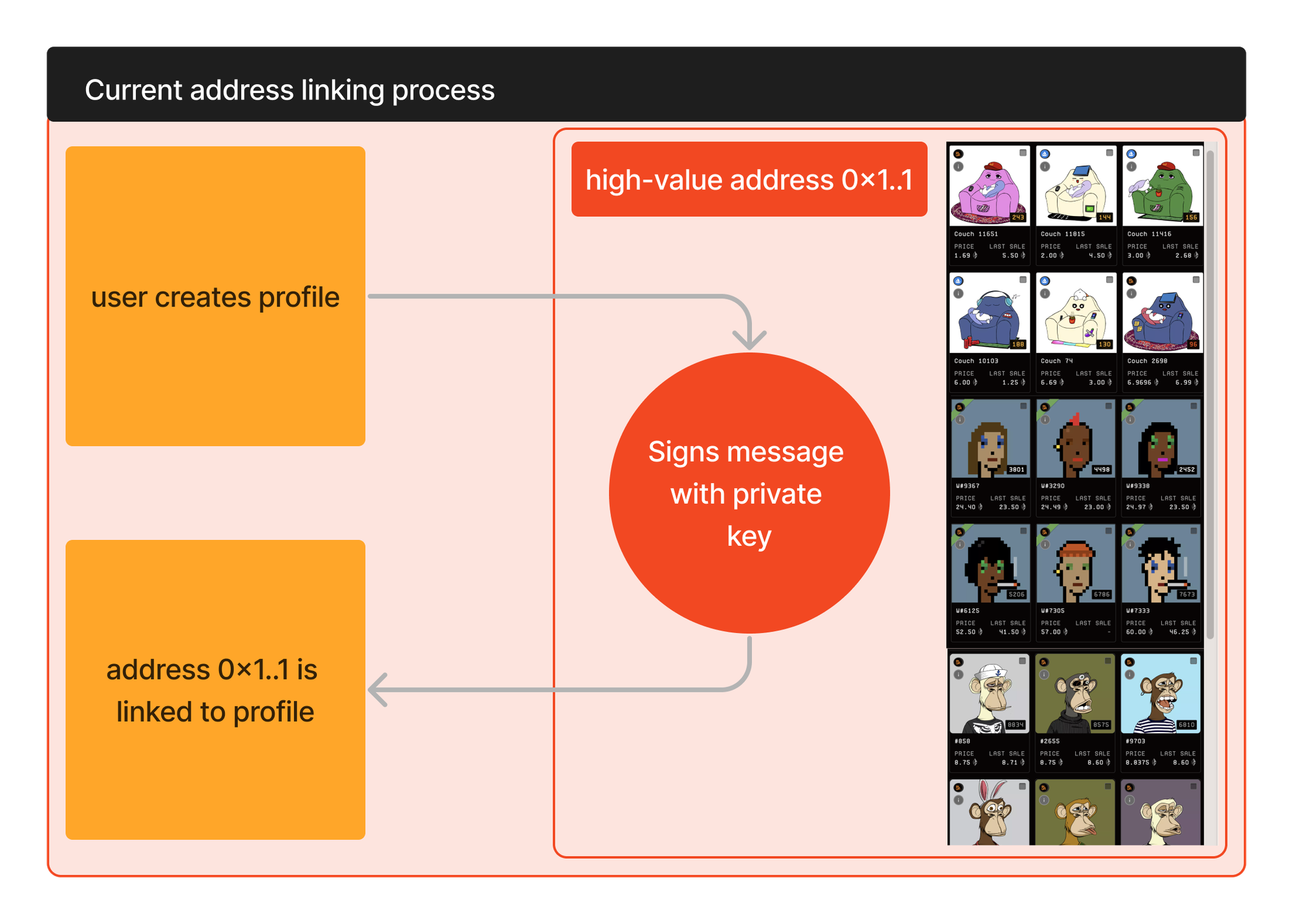
A number of popular protocols require users to link their asset holding wallets with their off-chain accounts. There are various ways to achieve this, with one common way being having the user sign a message with the private key for the address that holds the assets.

Users can be reluctant to do this. Often high-value assets will be in cold wallets that cautious users do not ‘put live’ unless under exceptional circumstances. Further to that, some users have a personal policy to not sign arbitrary messages.

Users need to sign a message for each address they wish to link.

<figure><img src="https://1707492302-files.gitbook.io/~/files/v0/b/gitbook-x-prod.appspot.com/o/spaces%2FXVbuZBFM6YbDqM0Dd1vM%2Fuploads%2FDG8kkjTqyuRHjJY9c7uu%2FLegacy%20Linking.png?alt=media&amp;token=26750937-658f-41d2-838b-d46d34546b7f" alt=""><figcaption><p>Legacy Linking</p></figcaption></figure>

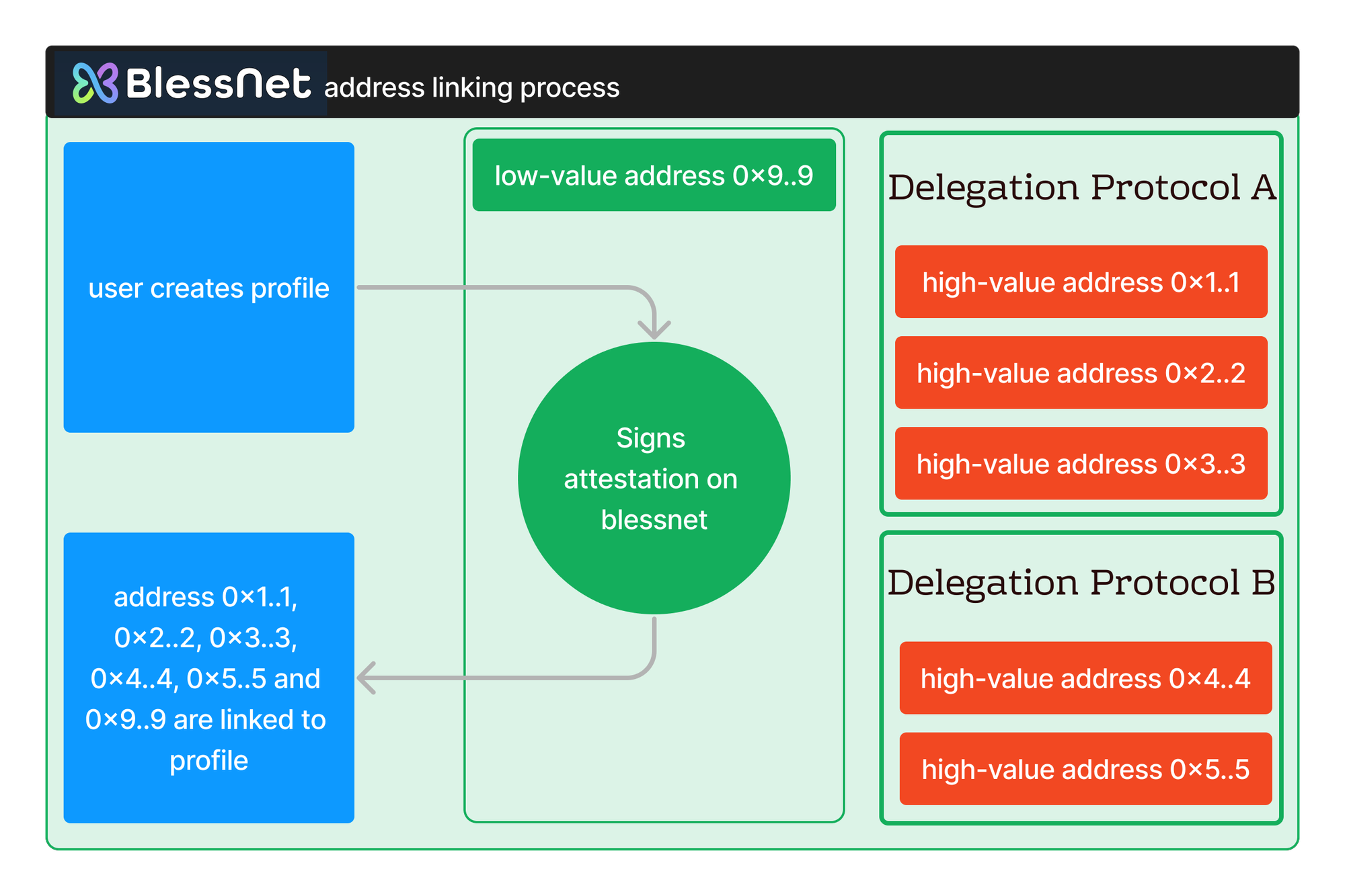
To link an address using Blessnet the user makes an attestation transaction on Blessnet mainnet. The user does not need to use the private key for the wallet with high-value assets. Rather they can use any address that has a link to their high-value address on popular delegation protocols.

The Blessnet attestation transaction proves that the user is authorised to link all of the addresses that are associated with the attestation address. This allows the user to link many addresses with a single transaction.

<figure><img src="https://1707492302-files.gitbook.io/~/files/v0/b/gitbook-x-prod.appspot.com/o/spaces%2FXVbuZBFM6YbDqM0Dd1vM%2Fuploads%2FvcuYKi4VDXU0DTvIs4PK%2FBlessnet%20Linking.png?alt=media&amp;token=1c7bbc74-0f9a-4489-9d98-83d7fe503225" alt=""><figcaption><p>Blessnet Linking with Attestations</p></figcaption></figure>

## Implementation&#x20;

### Overview

An integration with blessnet attestations is as simple as swapping out the code that currently calls for a signed message from a given address and replacing it with a call to the `attest()` method on the blessnet attestation contract. The `attest()` method will return an array with all addresses which the calling address can attest for (including itself).

The `attest()` method must be passed an array of addresses that the calling address can make an attestation for. You can think of this as all the addresses that have delegated to this address on a range of protocols.

Blessnet provides an [API endpoint ](/blessnet-api/addresses-address-vaults)that returns this array for a given address. You then just pass this address as the argument on the `attest()` call.&#x20;

The `attest()` method will return an array with all addresses it has been passed that are **valid**. It will **not** pass back any addresses that are not a valid attestation.&#x20;

If **none** of the addresses it has been passed are valid attestations it will revert (although as you will be passing the address's own address as one of the entries this should never be the case).

Now you can iterate through the array of returned addresses and link them all with the user’s profile.

Note - users will need to make the `attest()` call on blessnet, which is it’s own chain. This will require them to have a very (very) small balance of BLESS, blessnet’s native token.&#x20;

### Step by Step

Below is a step by step implementation for an example application.&#x20;

This example application has a users that has created an account id (@omnus). The user has a connected hot wallet (omnus.eth).&#x20;

The application uses a Blessnet Attestation to associate @omnus with every Ethereum address that omnus.eth is allowed to represent.

#### Step One

Get all of the addresses that omnus.eth is allowed to represent. Blessnet aggregates delegation data from a number of popular protocols and provides this on an API endpoint. Make a request to [vaults](/blessnet-api/addresses-address-vaults) passing the connected address (the address for omnus.eth). Note that ENS addresses are not, yet, supported on the API call.

#### Step Two

Attestations are made on Blessnet. The user will need to add the Blessnet chain and switch to it in order to submit the Attestation transaction.

Your wallet provider will likely provide methods for both of these actions (for example [this approach for Metamask](https://docs.metamask.io/wallet/reference/wallet_addethereumchain/)). The chain details for Blessnet can be found in the [Blessnet Chain Details](/reference/blessnet-chain-details) section.

{% hint style="info" %}
Your users will need BLESS token for gas to make the Attestation call. \
\
Blessnet is delighted to support early adopters. We can offer automatically delivered BLESS to your users to support a smooth Attestation process. \
\
Please see the [BLESS Sprinkler](/bless-token/bless-sprinkler) section for more information.
{% endhint %}

#### Step Three

From step one you have an array of all addresses that omnus.eth can represent. This includes its own address and any valid delegations.

Now form a call to the `attest()` method on Blessnet, passing in the user's address and the array of addresses that omnus.eth can represent.

For details of the Attestation contract address please see the [Reference section](/reference/contract-addresses#attestations).

The Attesation [contract ABI is also available](/contract-abi/attestions.sol).

The `attest()` method takes the following arguments:

<details>

<summary>attestationTypeId_  |  <code>uint96</code></summary>

This type ID signifies the type of attestation being made. **Anyone** can add attestation types to Blessnet. The ID is a sequential number, with users adding types able to specify text, a URI and bytes parameter for each type.

For example, you may want to be able to easily identify a group of assetations and link them with a label. You create the attestation type, are assigned type ID 983, and use that when submitting your users attestations.

See [Adding Attestation Types](#adding-attestation-types) for more details.

If you don't have a specifc ID you can pass 0.

</details>

<details>

<summary>attestedFor_  |  <code>address[]</code></summary>

This is the array of addresses that the calling address is attesting for.&#x20;

Pass in the array of addresses from step one.

</details>

<details>

<summary>attestationString_  |  <code>string</code></summary>

Any arbitrary string that you want to store with the attestation. Is emitted.

</details>

<details>

<summary>attestationBytes_  |  <code>bytes</code></summary>

Any arbitrary bytes that you want to store with the attestation. Is emitted.

</details>

<details>

<summary>attestationTarget _ |  <code>bytes32</code></summary>

Any arbitrary bytes32 that you want to store with the attestation. Is emitted.

</details>

**Example call**:&#x20;

```solidity
attest(0, [0x1234..5678, 0x4321..8765], "JayLtd signup", 0x, 0x000..00) 
```

#### Step Four

The Attestation transaction emits the valid delegates for the caller address, together with the arbitrary data you provided on the call (string, bytes and bytes32).

You can wait for the transaction to complete, read the event from the log, and add the valid links. Alternatively you can have a asynchronous watch for all new events that match your attestation type, loading the links as new events are emitted.

## Adding Attestation Types

**Anyone** can add attestation types to Blessnet. The ID is a sequential number. Users can specify text, a URI and bytes parameter for each type.

If you need to identify a particular type of attestation please feel free to add one to Blessnet.

For example, you may want to be able to easily identify a group of assetations and link them with a label. You create the attestation type, are assigned type ID 983, and use that when submitting your users attestations.

Bear in mind that anyone can submit an attestation of any type.

To add an Attestation Type please see `addAssetationType()` in the [contract ABI,](/contract-abi/attestions.sol) or visit the contract on scan.bless.net (sepolia-scan.bless.net for sepolia).


# Ethereals

Benefit from your assets, even when they aren't on Blessnet.

<figure><img src="https://1707492302-files.gitbook.io/~/files/v0/b/gitbook-x-prod.appspot.com/o/spaces%2FXVbuZBFM6YbDqM0Dd1vM%2Fuploads%2Fxn7TFmz6Ty68WPu82ye9%2Fimage.png?alt=media&amp;token=7f7d6fc4-b9ec-4d11-a672-73115fb65d01" alt=""><figcaption></figcaption></figure>

Ethereals take a similar approach to [Mirrors](/blessnet-apps/mirrors). Ethereals are Blessnet real-time mirror images of tokens and collections on another chain.

Whereas Mirrors operate to reflect whole infrastructure protocols, such as delegations or address naming registers, Ethereals operate at the token standard level. This generalised architecture allows any user to setup a Blessnet Ethereal for an ERC-20, ERC-721 or ERC-1155 token on another chain.

Only one Ethereal can be created per contract address per chain. For example, only one Ethereal collection for contract address `0x1D20A51F088492A0f1C57f047A9e30c9aB5C07Ea` from chain 1 (Ethereum Mainnet) can be created.

Creating an Ethereal results in a Blessnet contract that replicates its source contract in real-time. The user who created the Ethereal has no special privileges on this contract, but they do seed the contract with BLESS to pay gas for real-time replication. Any user can, at any time, seed additional BLESS to the contract to pay for future gas. Seeded BLESS cannot be withdrawn.

Ethereals **cannot be transferred** or traded in any way. They follow what happens on their source chain in real-time.


# Mirrors

Cross-chain data aggregation

<figure><img src="https://1707492302-files.gitbook.io/~/files/v0/b/gitbook-x-prod.appspot.com/o/spaces%2FXVbuZBFM6YbDqM0Dd1vM%2Fuploads%2FAW46ZlEfPDt3uir0BG3Z%2Fimage.png?alt=media&amp;token=21bd17cb-c2cd-4684-933e-534b56c5b2e2" alt=""><figcaption></figcaption></figure>

Cross-chain data access is an increasing issue. Interactions are spread across multiple chains, and it's more common to need data from chains other than the one you are using.

Where useful data is available on other chains Blessnet can mirror this data in real-time. This allows users to make use of the chain features they are accustomed to, from a range of protocols and potentially from a range of chains.

Our first set of mirrors is for delegations. Data from a range of delegation protocols is replicated in real-time on Blessnet, allowing smart contracts to make use of this valuable data without the need to transact on mainnet or other value bearing chains.


# Modular Permissions

Safety and Convenience

<figure><img src="https://1707492302-files.gitbook.io/~/files/v0/b/gitbook-x-prod.appspot.com/o/spaces%2FXVbuZBFM6YbDqM0Dd1vM%2Fuploads%2FUpYrEmJkXcrIuODzkFBC%2Fimage.png?alt=media&amp;token=d5e5007b-bf1c-4e85-8b2b-ff126d09e5a6" alt=""><figcaption></figcaption></figure>

## Get things done

Blessnet is a chain for **doing** things, with an emphasis on doing things cheaply, conveniently and confidently. Abstracting your interactions away from Value Bearing Chains plays a big part in this. Blessnet Modular Permissions further enhances this architecture.

Delegating certain permissions from one address to another address is not a new concept. The purpose is to narrowly scope what another address can do on behalf of your ‘main’ address. This allows you to interact using this other, less valuable address, but only in the ways you define.

In all current implementations of this you need to have this second address before you begin. For example, you have your main vault address and a hot wallet in a browser extension. Delegating from your vault to your hot wallet is straightforward, but you still have to have your hot wallet ready to go.

Blessnet reimagines this process as something as intuitive as using a game controller. In Blessnet your main address is the console, and you can create multiple controllers for that console, each with a set of permissions.

For example, let’s say we have our vault address, which we will call vault.eth. This address, vault.eth, is now our Modular Permissions console. We then create a controller and assign this permission to vote on behalf of vault.eth.

The implementation of this controller is a smart wallet, with a new private key and a new public address. At the same time Blessnet will prompt you for a transaction that confirms the delegation of voting permissions from your console (vault.eth) to your new controller.

You can now use your new controller to take part in votes on Blessnet on behalf of vault.eth. You never need use vault.eth for these votes, keeping it and the assets it holds safe. And as the controller is a smart wallet, you can submit your transaction directly from the app. If for some reason your controller is compromised you can simply detach it from your console, and if needed create a new controller.

The diagram below summarises this example.

<figure><img src="https://1707492302-files.gitbook.io/~/files/v0/b/gitbook-x-prod.appspot.com/o/spaces%2FXVbuZBFM6YbDqM0Dd1vM%2Fuploads%2Ff6iFRfTyCLTIiISVE3eg%2Fimage.png?alt=media&amp;token=07e18f2c-3fe7-44d7-b276-bf590a843aae" alt=""><figcaption></figcaption></figure>


# Transaction Bridge

Do things on Blessnet, own things somewhere else.

<figure><img src="https://1707492302-files.gitbook.io/~/files/v0/b/gitbook-x-prod.appspot.com/o/spaces%2FXVbuZBFM6YbDqM0Dd1vM%2Fuploads%2FPTHViKBfgBTEKyVV03Rv%2Fimage.png?alt=media&amp;token=6fbb962c-1d62-4e51-b798-4aa2b286f453" alt=""><figcaption></figcaption></figure>

The Blessnet Transaction Bridge is used to send transactions **from** Blessnet ***to*** other chains.

The Transaction Bridge itself is on-chain. It supports a simple interface that developers can use to submit cross-chain messages.

Contracts interacting with cross-chain messages from the transaction briddge can implement a simple base contract for message delivery.


# Whitepaper

The aims, vision and functional basis for Blessnet.

{% hint style="info" %}
**Vision**

Blessnet aims to create a more interconnected and efficient Ethereum ecosystem, where users can interact safely across multiple chains while keeping their valuable assets secure on established networks.
{% endhint %}

## Vertical Scaling for Ethereum

Layer 2 solutions greatly increase the blockspace available in the Ethereum ecosystem. They allow reduced transaction cost and expand the use cases for smart contracts. They drive innovation and allow builders to connect with users in new and exciting ways.

Layer 2 solutions also fragment the Ethereum ecosystem, carving liquidity into disparate silos. Users are left tracking assets across a range of chains and contract addresses. Complexity increases, and the user experience suffers. While there are other proposals for reducing this fragmentation, all of them seem years away from delivering a solution.

A key metric for Layers 2s is TVL (total value locked), with projects competing to lock as much value as possible on **their** Layer 2. A Layer 2 ‘wins’ when it pulls the most value into itself, regardless of the health of the ecosystem as a whole.

It’s easy to see this as **horizontal** scaling. Total capacity has been increased by the addition of numerous silos running side-by-side above Ethereum mainnet. There are more places to transact, but they are all doing so separately, with little overt involvement of other chains.

At the same time, users generally want **mainnet** assets. They naturally want low transaction fees. But at the end of the transaction they would like to hold **mainnet** assets.

Blessnet is an entirely new type of chain, with the express aim of delivering **vertical** scaling to Ethereum. Blessnet’s infrastructure supports transactions that either originate from or settle assets on **other** chains. Blessnet is a chain where you do things, with your valuable assets residing on other chains. Blessnet therefore works in direct partnership with existing chains; it’s aim being to enhance the overall ecosystem, and build as little TVL on itself as possible.

## Functionality and Safety

Crypto assets should do things. At a basic level most assets can be traded, but there are a vast and growing number of use cases for crypto assets. A common example is using the ownership of an asset to offer rewards. This might be the membership of a on-line community, participation in an NFT mint, or an airdrop allocation.

Rewarding the holders of existing assets in this way can be hazardous. Users often need to prove their ownership of assets in such a way that exposes those assets to risk, for example claiming an airdrop with the wallet that holds the NFTs.

Blessnet provides a level of abstraction from the chain where assets reside, by allowing users to make claims on Blessnet. Users can still use the **same wallet as on mainnet**, but they are **not** signing a mainnet transaction. All on-chain transactions include a chain identifier. A transaction submitted with the chain ID of Blessnet (45513), cannot be executed on a chain with another chain ID (e.g. chain ID 1 for Ethereum Mainnet). As the underlying assets are **not** on Blessnet they cannot be transferred by a transaction submitted on Blessnet.

The mint of the mainnet assets that are being airdropped can then be sent cross-chain from Blessnet to mainnet. This means that the user has never had to connect their wallet on mainnet. They have never had to potentially put mainnet assets at risk. But at the end of the claim they still have new mainnet assets.

## Value Bearing vs Transaction Processing

Within the Blessnet team we talk about Value Bearing Chains (VBCs). These are the chains where valuable assets should be stored. The names of these chains are familiar, and include Ethereum Mainnet, Arbitrum, Optimism and Base.

Transaction Processing Chains (TPCs) on the other hand are **not** where valuable assets are stored, but where users perform actions. These are the chains where users play games, take part in votes and claim airdrops.

For asset safety - and user peace of mind - there should be separation between TPCs and VBCs. Taking part in an on-chain vote should be very cheap, and leave you with absolutely zero concern that you are doing something unintentional with assets on VBCs.

The barrier for creating a new TPC can be quite low. The value of the TPC is in what it allows you to ***do***, not its TVL.

The barrier for a new VBC should be very high! People want to know that their assets are held in the most secure location possible. And - ideally - users should only interact with the VBC when they **want** to move assets. Everything else should take place on TPCs.

Blessnet’s philosophy is that we have sufficient VBCs already, but that we need more TPCs that are focussed on allowing people to do more safely, which eschewing any attempt to accumulate a high TVL. TPCs avoid a high TVL by leaving existing assets on, and delivering new assets to, VBCs.

## Bringing off-chain back on-chain

The use of off-chain signatures has surged in recent years, with an increasing number of protocols using signed arbitrary messages. The advantage of this approach is clear: users can interact with protocols without incurring an immediate gas cost. This move was in part driven by blockchain congestion and therefore very high gas costs.

We now have a relative abundance of blockspace. Many of these off-chain workflows should come ***back*** on-chain. Blessnet facilitates this by providing very cheap blockspace where developers can both interact with data from other chains and easily settle valuable assets on established, value bearing chains (VBCs).

## Mirrors and Ethereals: Through the looking glass

Blessnet’s ultra-cheap blockspace and all-ecosystem philosophy allows it to do things that no other chain can. Among these are Mirrors and Ethereals.

### Mirrors

{% hint style="success" %}
Development Status: Live
{% endhint %}

Where useful data is available on other chains Blessnet can mirror this data in real-time. This allows users to make use of the chain features they are accustomed to, from a range of protocols and potentially from a range of chains.

Our first set of mirrors is for delegations. Data from a range of delegation protocols is replicated in real-time on Blessnet, allowing smart contracts to make use of this valuable data without the need to transact on mainnet or other value bearing chains.

### Ethereals

{% hint style="info" %}
Development Status:  **Q4 2024**
{% endhint %}

Ethereals take a similar approach to mirrors. Ethereals are Blessnet real-time mirror images of tokens and collections on another chain.

Whereas Mirrors operate to reflect whole infrastructure protocols, such as delegations or address naming registers, Ethereals operate at the token standard level. This generalised architecture allows any user to setup a Blessnet Ethereal for an ERC-20, ERC-721 or ERC-1155 token on another chain.

Only one Ethereal can be created per contract address per chain. For example, only one Ethereal collection for contract address `0x1D20A51F088492A0f1C57f047A9e30c9aB5C07Ea` from chain 1 (Ethereum Mainnet) can be created.

Creating an Ethereal results in a Blessnet contract that replicates its source contract in real-time. The user who created the Ethereal has no special privileges on this contract, but they do seed the contract with BLESS to pay gas for real-time replication. Any user can, at any time, seed additional BLESS to the contract to pay for future gas. Seeded BLESS cannot be withdrawn.

Ethereals **cannot be transferred** or traded in any way. They follow what happens on their source chain in real-time.

### Why Mirrors and Ethereals?

Mirrors and Ethereals allow users to interact on Blessnet as if they were on another chain. For example, you can build a protocol that uses delegations made on mainnet. Or you can hold a vote for all holders of a given NFT, by using the Ethereal contract on Blessnet.

Do you have an end result that needs to affect another chain, for example the result of a vote? Blessnet is built for this too, and you can achieve this through the Transaction Pool.

## Transaction Pool

{% hint style="success" %}
Development Status: **Live**
{% endhint %}

The Blessnet Transaction Pool is used to send transactions **from** Blessnet ***to*** other chains.

The Transaction Pool itself is on-chain. It supports a simple interface that developers can use to submit cross-chain messages.

Contracts interacting with cross-chain messages from the transaction pool can implement a simple base contract for message delivery.

### CRON-type On-chain Jobs

{% hint style="info" %}
Development Status: **Q2 2025**
{% endhint %}

In addition to supporting atomic cross-chain messaging, the transaction pool has been designed to facilitate CRON style interactions, including the scheduling of repeating on-chain jobs.

## BLESS: Self-bridging, Natively Multi-chain

{% hint style="success" %}
Development Status: **Live**
{% endhint %}

BLESS is the native gas token of Blessnet. It has a fixed supply of 1 billion tokens.

All tokens have been minted. There is currently no vesting or emissions schedule.

### Seamless Bridging

Blessnet aims to support the entire Ethereum ecosystem. In reflection of that BLESS is natively multi-chain.

On Blessnet BLESS operates as a standard gas token. When not on Blessnet BLESS is an ERC20 token with cross-chain technology baked in. The token contract includes self-bridging methods that leverage Wormhole and the Arbitrum Nitro rollup bridge. This allows BLESS to bridge **itself** between supported chains.

BLESS bridging consists of three possible flows, as illustrated below.

<figure><img src="https://1707492302-files.gitbook.io/~/files/v0/b/gitbook-x-prod.appspot.com/o/spaces%2FXVbuZBFM6YbDqM0Dd1vM%2Fuploads%2FZhHue7ug2Sz4Mgmrt2op%2FBless%20bridge%20flow%201.png?alt=media&amp;token=9c01254c-8c62-4caa-9428-212932e9f599" alt=""><figcaption><p>Bridging from a non-parent (Arbitrum) and non-child (Blessnet) chain</p></figcaption></figure>

<figure><img src="https://1707492302-files.gitbook.io/~/files/v0/b/gitbook-x-prod.appspot.com/o/spaces%2FXVbuZBFM6YbDqM0Dd1vM%2Fuploads%2FqPOtBqr6yJQhZlQHLEKY%2FBless%20bridge%20flow%202.png?alt=media&amp;token=1bcca9f6-6684-4dcc-98bb-6cb161e329d9" alt=""><figcaption><p>Bridging from the parent (Arbitrum)</p></figcaption></figure>

<figure><img src="https://1707492302-files.gitbook.io/~/files/v0/b/gitbook-x-prod.appspot.com/o/spaces%2FXVbuZBFM6YbDqM0Dd1vM%2Fuploads%2FEuckOk3QfNJUNTv4RaSb%2FBless%20bridge%20flow%203.png?alt=media&amp;token=72631dc8-58e8-4b1d-bdfa-1ee04aa81402" alt=""><figcaption><p>Bridging from Blessnet</p></figcaption></figure>

### Single Contract Address

The BLESS ERC20 is deployed using the CREATE2 opcode to supported chains, meaning that it has the same contract address no matter where you as using it. You don’t have to remember an endless list of contract addresses that vary between chains.

On mainnets the BLESS contract address is `0x000000000000CCA70B6e0997a94681a3114EdDD7`

On testnets the BLESS contract address is `0x0000000000BBfbab0236d05c06211853f812ec57`

The BLESS self-bridging ERC20 token is currently supported on the following chains:

* Ethereum Mainnet
* Arbitrum Mainnet
* Optimism Mainnet
* Base Mainnet
* Polygon Mainnet
* Blast Mainnet
* Ethereum Sepolia
* Arbitrum Sepolia
* Optimism Sepolia
* Base Sepolia

### No Large Bridge Balances

As BLESS can self-bridge it does not need to rely on external custodial bridge contracts.

Instead, when moving from chain to chain BLESS is burned on the sending chain and minted on the receiving chain. This eliminates the need for large custodied balances on numerous chains.

The exception is the Arbitrum Nitro rollup bridge that custodies BLESS ERC20 tokens that are represented as native gas token on Blessnet.

### Enhanced UX

Self-bridging allows BLESS to eliminate some of the poor UX commonly experienced when bridging assets, particularly to rollup chains.

BLESS can be bridged from any supported chain to any supported chain in a single user transaction. The contract itself mplements the required route to the destination chain.

This includes native withdrawals from Blessnet itself. Traditionally for rollups this involves a number of user actions. For example, moving from a rollup to a non-parent chain would involve three user initiated transactions. A withdrawal transaction on the rollup, a transaction on the parent chain to receive the withdrawal, and then a further transaction to bridge to the destination chain.

BLESS bridging has eliminated these further calls, allowing the user to make a single withdrawal transaction on Blessnet and have BLESS delivered to the chain of their choice.

### Improved Traceability

All movements of BLESS are tracked in realtime, and can be interrogated on demand. In the future we will have a user interface to enable everyone to keep updated with the status of their bridged BLESS.

### Governance Ready

The BLESS ERC20 implements ERC20Votes for on-chain governance.

### BLESS is Built to be Used

BLESS is built to be used, both as a gas token for Blessnet transactions and as forwarded native token for delivering transactions to other chains.

Gas is very cheap on Blessnet. You will never need much BLESS to perform transactions on Blessnet. There is no purpose to holding any excess BLESS on blessnet itself that you do not intend to use as payment for gas.

## Cross-chain Data Aggregation

As Blessnet can draw from many protocols on many chains it provides a unique degree of cross-chain data aggregation. This allows Blessnet to offer some unique services. Examples are provided below.

### Blessnet Attestations

{% hint style="success" %}
Development Status: **Live**
{% endhint %}

A number of popular protocols require users to link their asset holding wallets with their off-chain accounts. There are various ways to achieve this, with one common way being having the user sign a message with the private key for the address that holds the assets.

Users can be reluctant to do this. Often high-value assets will be in cold wallets that cautious users do not ‘put live’ unless under exceptional circumstances. Further to that, some users have a personal policy to not sign arbitrary messages.

Users need to sign a message for each address they wish to link.

<figure><img src="https://1707492302-files.gitbook.io/~/files/v0/b/gitbook-x-prod.appspot.com/o/spaces%2FXVbuZBFM6YbDqM0Dd1vM%2Fuploads%2FsGfb0r91cyf1i5HxKUTe%2FLegacy%20Linking.png?alt=media&amp;token=19807f3b-818d-4618-89e8-1c51982468f7" alt=""><figcaption><p>Legacy Linking</p></figcaption></figure>

To link an address using Blessnet the user makes an attestation transaction on Blessnet mainnet. The user does not need to use the private key for the wallet with high-value assets. Rather they can use any address that has a link to their high-value address on popular delegation protocols.

The Blessnet attestation transaction proves that the user is authorised to link all of the addresses that are associated with the attestation address. This allows the user to link many addresses with a single transaction.

<figure><img src="https://1707492302-files.gitbook.io/~/files/v0/b/gitbook-x-prod.appspot.com/o/spaces%2FXVbuZBFM6YbDqM0Dd1vM%2Fuploads%2F1dvR25QtvCL7mYFqgKE0%2FBlessnet%20Linking.png?alt=media&amp;token=dae3514f-2431-4f8e-91c3-65eca614fb9f" alt=""><figcaption><p>Blessnet Linking</p></figcaption></figure>

## Cross-chain: Current and Future Approaches

Cross-chain transactions, in both directions, are fundamental to Blessnet’s mission. We therefore have a plan to continually strengthen this process.

Please note that the below refers to cross-chain transaction only, not BLESS bridging. BLESS bridging uses Wormhole and the Arbitrum Nitro rollup bridge.

### Phase 1: Mainnet Beta, Oracle Based Delivery

{% hint style="success" %}
Development Status: **Live**
{% endhint %}

Blessnet is currently in mainnet beta. During this phase all cross-chain transactions are delivered by the Blessnet oracle.

The Blessnet oracle is a trusted, **centralised** service run by Otherchain Labs, the providers of Blessnet.

Using this approach has enabled us to move rapidly into mainnet operations, albeit in beta. The centralised nature of the Oracle should be noted by all users of Blessnet cross-chain transactions. If use of a centralised Oracle for delivery is not acceptable we recommend waiting until phase 2.

### Phase 2: Wormhole Query

{% hint style="info" %}
Development Status: **Q4 2024**
{% endhint %}

Phase 2 will make cross-chain transactions significantly more robust by including Wormhole Query.

While delivery will still be performed by an Oracle, all transactions will need to include a signed VAA from the Wormhole Guardians in order to be processed.

This will significantly reduce the centralisation risks presented by phase 1.

### Phase 3: Storage Proofs

{% hint style="info" %}
Development Status: **Q2 2025**
{% endhint %}

Phase 3 of Blessnet cross-chain transactions will likely involve storage proofs, providing a further level of decentralisation to our transaction delivery approach.

## Modular Permissions

{% hint style="info" %}
Development Status: **Q4 2024 / Q1 2025**
{% endhint %}

Blessnet is a chain for **doing** things, with an emphasis on doing things cheaply, conveniently and confidently. Abstracting your interactions away from Value Bearing Chains plays a big part in this. Blessnet Modular Permissions further enhances this architecture.

Delegating certain permissions from one address to another address is not a new concept. The purpose is to narrowly scope what another address can do on behalf of your ‘main’ address. This allows you to interact using this other, less valuable address, but only in the ways you define.

In all current implementations of this you need to have this second address before you begin. For example, you have your main vault address and a hot wallet in a browser extension. Delegating from your vault to your hot wallet is straightforward, but you still have to have your hot wallet ready to go.

Blessnet reimagines this process as something as intuitive as using a game controller. In Blessnet your main address is the console, and you can create multiple controllers for that console, each with a set of permissions.

For example, let’s say we have our vault address, which we will call vault.eth. This address, vault.eth, is now our Modular Permissions console. We then create a controller and assign this permission to vote on behalf of vault.eth.

The implementation of this controller is a smart wallet, with a new private key and a new public address. At the same time Blessnet will prompt you for a transaction that confirms the delegation of voting permissions from your console (vault.eth) to your new controller.

You can now use your new controller to take part in votes on Blessnet on behalf of vault.eth. You never need use vault.eth for these votes, keeping it and the assets it holds safe. And as the controller is a smart wallet, you can submit your transaction directly from the app. If for some reason your controller is compromised you can simply detach it from your console, and if needed create a new controller.

The diagram below summarises this example.

<figure><img src="https://1707492302-files.gitbook.io/~/files/v0/b/gitbook-x-prod.appspot.com/o/spaces%2FXVbuZBFM6YbDqM0Dd1vM%2Fuploads%2FBmM9V3gSNn4nws1yhxZp%2FModularPermissions.png?alt=media&amp;token=98f0222e-859e-4c48-a674-af7699115647" alt=""><figcaption><p>Modular Permissions</p></figcaption></figure>

## Example User Stories

Blessnet’s capabilities may be best understood with examples. In this section we detail a number of example user stories.

### Example One - Cross-chain Claim

In this example we have a new ERC-20 token on mainnet Ethereum. This token has a portion of its supply allocated to users based on their holding of existing NFTs.

Barry has been allocated 1,000 tokens based on his NFT holdings. Barry is a cautious user and holds all his NFTs in and EOA (externalls owned account) cold wallet. We will call this cold wallet barryvault.eth.

Barry doesn’t want to connect barryvault.eth to mainnet. Fortunately for Barry the claim process implements Blessnet, and he can claim his tokens without ever touching mainnet.

For Barry the process involves him making a claim transaction on Blessnet. He can see that he is signing a transaction for chain ID 45513, **not** mainnet (chain ID 1). As he is signing a transaction, rather than an arbitrary message, he knows that what he is signing can only effect the assets he holds on Blessnet. Barry has nothing on Blessnet other than a small amount of BLESS, which is Blessnet’s native gas token.

Barry controls the address associated with barryvault.eth on all EVM chains, including Blessnet. He therefore proves control of that address on mainnet by submitting the transaction on Blessnet.

The flow of this transaction, on Blessnet between chains and on mainnet, is summarised in the diagram below.

<figure><img src="https://1707492302-files.gitbook.io/~/files/v0/b/gitbook-x-prod.appspot.com/o/spaces%2FXVbuZBFM6YbDqM0Dd1vM%2Fuploads%2FSapeOZgPV8v6uHprGfgU%2FExample%201.png?alt=media&amp;token=aa450a75-33a6-4b5f-a414-af08be63d45b" alt=""><figcaption><p>Cross-chain Claim</p></figcaption></figure>

Barry’s transaction creates a permanent on-chain record in the Blessnet transaction pool (the green box above). It also emits an event that is picked up by the Blessnet cross-chain Relayer. the transaction also takes a quantity of BLESS token that is used to offset the gas used on the delivery to mainnet Ethereum.

The Blessnet Relayer implements the transport layer method that has been configured for this claim. The above example is using Wormhole Query to generate a signed VAA (Verified Action Approval) that the receiving smart contract can use to verify the data it receives. This is the Phase 2 implementation of Blessnet’s cross chain messaging. In mainnet beta (Phase 1) messages are delivered in trusted Oracle mode, without use of a Wormhole VAA for validation.

The NFT contract on mainnet Ethereum receives the cross-chain message, validates the source and its contents, and mints the ERC20 token to barryvault.eth.

In this example Barry has claimed his mainnet token without needing to make a mainnet transaction. Since he has not interacted directly with mainnet Ethereum he is protected from unintentional mainnet asset transfers.

### Example Two: Delegated Cross-chain Claim

This example is an extension of Example One. Read that one first before reading this one.

In this example we are also doing an airdrop claim, but this time we aren’t using the wallet that has the allocation.

In this example our wallet barryvault.eth has, at some time in the past, delegated authority to wallet barryhot.eth. This delegation was performed on mainnet Ethereum from one of a number of popular protocols. Blessnet mirrors new delegations and revoked delegations in real-time, so the Blessnet delegation mirror is aware of the delegation between barryvault.eth and barryhot.eth.

The claiming flow is broadly the same as in example one, but here the claim contract makes a check on the Delegation Mirror that the connected address, barryhot.eth, is authorised to make this transaction on behalf of barryvault.eth. This is shown in the diagram below.

<figure><img src="https://1707492302-files.gitbook.io/~/files/v0/b/gitbook-x-prod.appspot.com/o/spaces%2FXVbuZBFM6YbDqM0Dd1vM%2Fuploads%2Fbc1PywfxJMzN31WEt82E%2FExample%202.png?alt=media&amp;token=c9241110-0ff6-46c5-94c1-ddbb0321bcaf" alt=""><figcaption><p>Delegated Cross-chain Claim</p></figcaption></figure>

## Example Three: Modular Permissions Cross-chain Claim

Expanding on example 2, we can also make this claim using a Modular Permissions smart wallet setup for the console address barryvault.eth. For details on Modular Permissions see the Modular Permissions section.

When using a controller the process flow is very similar to our delegated claim, with the exception that it is the smart wallet associated with the given controller is checked for the permission required. This example is summarised in the below diagram.

<figure><img src="https://1707492302-files.gitbook.io/~/files/v0/b/gitbook-x-prod.appspot.com/o/spaces%2FXVbuZBFM6YbDqM0Dd1vM%2Fuploads%2FvCMgXBJwq5WLZrRBDUZp%2FExample%203.png?alt=media&amp;token=085118c1-741b-48cf-b7e4-d77c36850c0f" alt=""><figcaption></figcaption></figure>

## Blessnet’s Principles

### A True App-Chain

Blessnet is an App Chain in the truest sense of the term: it exists as a place for interactions, as a place to *do things*. Blessnet’s target TVL is ZERO. It doesn’t want your existing assets; they can stay exactly where they are! Blessnet wants to be the a place you can do the fun, useful and rewarding things that your assets allow you to do, with a focus on safety and a well-considered a user experience.

### Economically Stable and Sustainable

Blessnet is focussed on being economically sustainable. It doesn’t want a large TVL and isn’t at all interested in the burden of a hyper-inflated valuation. Blessnet has a constant and granular understanding of the operating costs of the chain, and how these are defrayed by users spending BLESS token for transaction costs (gas fees). Our economic cornerstone is coverage of operating overheads with the revenue from gas fees. This sustainable economic focus gives us the launch-pad to tackle our more ambitious long-term aims, and gives us freedom to experiment in ways that very few chains can.

### Low Costs and Low Holdings

Our architecture guarantees very low transaction costs. A small amount of our native gas token BLESS will go a long way, particularly if most of your transactions occur on Blessnet and not across chains. The sole reason to hold BLESS is so you can pay for transaction costs. So you are never going to need a lot of BLESS. Don’t hold more than you need!

### Focus on User Experience

In crypto the user experience tends to come second. And sometimes not at all.

At Blessnet our aim is to always circle back to the user experience. Something can be technicaly exciting. But unless it’s also usable we won’t proceed.


# Technical Reference

<figure><img src="https://1707492302-files.gitbook.io/~/files/v0/b/gitbook-x-prod.appspot.com/o/spaces%2FXVbuZBFM6YbDqM0Dd1vM%2Fuploads%2FYXZtBW1EyVpGhKt9JD5x%2Fimage.png?alt=media&amp;token=0ba2b3ea-e275-44ca-bbe5-a1732fa0ebb1" alt=""><figcaption></figcaption></figure>

In the following sections you will find technical reference information for Blessnet.


# Blessnet API URLs

Use Blessnet's API

<figure><img src="https://1707492302-files.gitbook.io/~/files/v0/b/gitbook-x-prod.appspot.com/o/spaces%2FXVbuZBFM6YbDqM0Dd1vM%2Fuploads%2FeMHk75tjEhgSZ48WcauF%2Fimage.png?alt=media&amp;token=74ddba6c-c64c-469b-b66d-3d061334db7c" alt=""><figcaption></figcaption></figure>

## API URLs

### Mainnet

```
https://api.bless.net
```

## Testnet

```
https://api.test.bless.net
```


# /account-abstraction/operations

{% hint style="info" %}
You need an API key for this call.\
\
Please reach out to the Blessnet team to get setup.
{% endhint %}

<mark style="color:green;">`POST`</mark>`/account-abstraction/operations`

The `/account-abstraction/operations` endpoint allows the posting of ERC-4337 operations to abstract accounts via the singleton on-chain entrypoint.

### **Headers**

| Name        | Value        |
| ----------- | ------------ |
| `x-api-key` | Your API key |

### **Params**

<table><thead><tr><th width="215">Name</th><th width="130">Mandatory?</th><th width="119">Default</th><th>Value</th></tr></thead><tbody><tr><td><code>chain</code></td><td>No</td><td><code>mainnet</code></td><td>The chain type we are working with, either <code>mainnet</code> or <code>sepolia</code></td></tr></tbody></table>

### Request Body

* required: true
* content: application/json:&#x20;
* schema:&#x20;

  * `type: array`&#x20;

  ```postman_json
  {
    "ops": [
      {
        "account": <the account the operations is for>,
        "target": <the address target for the call>,
        "calldata": <the calldata to pass to the target>,
      }
    ]
  }
  ```
* description: An array of valid operations.

### **Response Body**

| Name               | Type       | Description                                                               |
| ------------------ | ---------- | ------------------------------------------------------------------------- |
| `message`          | `string`   | Message response from the endpoint                                        |
| `requestOwner`     | `array`    | The owner of the API key that made the operation request.                 |
| `for`              | `array`    | Array of operations requested, with account, target and calldata for each |
| `destinationChain` | `number`   | The target chain for the operation                                        |
| `deliveryIds`      | `string[]` | Unique Ids for the execution of the operations.                           |

### **Example Request**

```
POST /account-abstraction/operations?chain=sepolia HTTP/1.1
Host: api.bless.net
x-api-key: <>
Content-Type: application/json
Content-Length: 763

{
  "ops": [
    {
      "account": "0xa8C46f79c72DbfE885e54b5527002c515F860875",
      "target": "0x4995423334127293b31d8c810Bb183809f82Be55",
      "calldata": "0x62a61351000000000000000000000000a8C46f79c72DbfE885e54b5527002c515F860875000000000000000000000000000000000000000000000000000000000000000500000000000000000000000000000000000000000000000000000000000000a0000000000000000000000000000000000000000000000000000000000000000100000000000000000000000000000000000000000000000000000000000001000000000000000000000000000000000000000000000000000000000000000002000000000000000000000000000000000000000000000000000000000000000100000000000000000000000000000000000000000000000000000000000000000000000000000000000000000000000000000000000000000000000000000000"
    }
  ]
}
```

### **Response**

{% tabs %}
{% tab title="201" %}

```json
{
    "message": "Ops requested",
    "requestOwner": "omnus",
    "for": [
        {
            "account": "0xa8C46f79c72DbfE885e54b5527002c515F860875",
            "target": "0x4995423334127293b31d8c810Bb183809f82Be55",
            "calldata": "0x62a61351000000000000000000000000a8C46f79c72DbfE885e54b5527002c515F860875000000000000000000000000000000000000000000000000000000000000000500000000000000000000000000000000000000000000000000000000000000a0000000000000000000000000000000000000000000000000000000000000000100000000000000000000000000000000000000000000000000000000000001000000000000000000000000000000000000000000000000000000000000000002000000000000000000000000000000000000000000000000000000000000000100000000000000000000000000000000000000000000000000000000000000000000000000000000000000000000000000000000000000000000000000000000"
        }
    ],
    "destinationChain": 11145513,
    "deliveryIds": ["67c8c05d179b8cbc49505f4e"]
}
```

{% endtab %}

{% tab title="400" %}

```json
{
  "message": "Please provide chainId and delegate address as query parameters."
}
```

{% endtab %}
{% endtabs %}

### Example uses

{% tabs %}
{% tab title="ethers" %}

<pre class="language-typescript"><code class="lang-typescript"><strong>import ethers from "ethers"
</strong><strong>
</strong><strong>const interface = new ethers.Interface(myABI)
</strong>const calldata = interface.encodeFunctionData("myFunction", [arg1, arg2])
const ops = [{
    account: myUserAccount,
    target: myContract,
    calldata,
}]

fetch("https://api.bless.net/account-abstraction/operations", {
    method: "POST",
    body: { ops }
})
</code></pre>

{% endtab %}

{% tab title="viem" %}

```typescript
import { encodeFunctionData } from "viem"

const interface = new ethers.Interface(myABI)
const calldata = encodeFunctionData({
    abi: myABI,
    args: [arg1, arg2],
    functionName: "myFunction",
})
const ops = [{
    account: myUserAccount,
    target: myContract,
    calldata,
}]

fetch("https://api.bless.net/account-abstraction/operations", {
    method: "POST",
    body: { ops }
})
```

{% endtab %}
{% endtabs %}


# /account-abstraction/operations/accounts/:address

{% hint style="info" %}
You need an API key for this call.\
\
Please reach out to the Blessnet team to get setup.
{% endhint %}

<mark style="color:green;">`GET`</mark>` ``/account-abstraction/operations/accounts/:address`

The `/account-abstraction/operations/accounts/:address` endpoint returns details of all operations submitted for a given account.

### **Headers**

| Name        | Value        |
| ----------- | ------------ |
| `x-api-key` | Your API key |

### **Path Variables**

<table><thead><tr><th width="215">Name</th><th width="130">Mandatory?</th><th width="119">Default</th><th>Value</th></tr></thead><tbody><tr><td><code>:address</code></td><td>Yes</td><td></td><td>The address of the account you are querying</td></tr></tbody></table>

### **Params**

<table><thead><tr><th width="192">Name</th><th width="130">Mandatory?</th><th width="119">Default</th><th>Value</th></tr></thead><tbody><tr><td><code>chain</code></td><td>No</td><td><code>mainnet</code></td><td>The chain type we are working with, either <code>mainnet</code> or <code>sepolia</code></td></tr></tbody></table>

### **Response Body**

The response provides an array of objects with a single entry representing an operation for the provided account.

The objects have the following properties:

<table><thead><tr><th width="247">Name</th><th width="114">Type</th><th width="389">Description</th></tr></thead><tbody><tr><td><code>_id</code></td><td><code>string</code></td><td>The unique Id for this transfer</td></tr><tr><td><code>status</code></td><td><code>string</code></td><td>The status of the operations.<br>Possible values:<br>- pending<br>- failed<br>- succeeded</td></tr><tr><td><code>source</code></td><td><code>string</code></td><td>The origin of the operation request.</td></tr><tr><td><code>sourceChain</code></td><td><code>string</code></td><td>The origin chain for the request, will be 0 if request originated off-chain.</td></tr><tr><td><code>sourceContract</code></td><td><code>string</code></td><td>The origin contract for the request, will be the zero address if request originated off-chain.</td></tr><tr><td><code>destinationChain</code></td><td><code>number</code></td><td>The chain Id of the chain this operation will run on</td></tr><tr><td><code>destinationContract</code></td><td><code>string</code></td><td>The contract address destination for this operation (i.e. the endpoint).</td></tr><tr><td><code>sourceKey</code></td><td><code>string</code></td><td>bytes32 hash of the submitting API key.</td></tr><tr><td><code>callData</code></td><td><code>string</code></td><td>The calldata to execute on-chain.</td></tr><tr><td><code>opAccount</code></td><td><code>string</code></td><td>The abstract account executing the operation.</td></tr><tr><td><code>opTarget</code></td><td><code>string</code></td><td>The target contract of the operation.</td></tr><tr><td><code>opCalldata</code></td><td><code>string</code></td><td>The hex calldata that will be executed.</td></tr><tr><td><code>opHash</code></td><td><code>string</code></td><td>Hash of the hex calldata.</td></tr><tr><td><code>processed</code></td><td><code>boolean</code></td><td>If the operation has been processed.</td></tr><tr><td><code>timestamp</code></td><td><code>string</code></td><td>Time of execution.</td></tr><tr><td><code>decodedError</code></td><td><code>object</code></td><td>Decoded information from error logs, if any.</td></tr><tr><td><code>error</code></td><td><code>boolean</code></td><td>Will be true if an error has occured.</td></tr><tr><td><code>errorDetails</code></td><td><code>object</code></td><td>Full dump of the error details logged.</td></tr></tbody></table>

### **Example Request**

<pre><code><strong>GET https://api.bless.net/account-abstraction/operations/accounts/:address?chain=sepolia
</strong></code></pre>

### **Response**

{% tabs %}
{% tab title="200" %}

```json
[
    {
        "_id": "67a37030d28e2c5e2784513e",
        "status": "succeeded",
        "source": "api-aa",
        "sourceChain": 0,
        "sourceContract": "0x0000000000000000000000000000000000000000",
        "destinationChain": 11145513,
        "destinationContract": "0xF638467824B175196856ac72FdCB6a92d61950d2",
        "sourceKey": "0x50866de637ba6022f5af826c863c5ce619ab70631dee5ecb3a0063116c4e0556",
        "calldata": {
            "to": "0xF638467824B175196856ac72FdCB6a92d61950d2",
            "data": "0x765e827f000000000000000000000000000000000000000000000000000000000000004000000000000000000000000038d62e7009752c9e04cb26a81f53fa5162ac3a4f00000000000000000000000000000000000000000000000000000000000000010000000000000000000000000000000000000000000000000000000000000020000000000000000000000000d46401394312c0aab2715851ca9aa45d915894eb000000000000000000000000000000000000000000000000000000000000000100000000000000000000000000000000000000000000000000000000000001200000000000000000000000000000000000000000000000000000000000000140000000000000000000000000000249f00000000000000000000000000007a120000000000000000000000000000000000000000000000000000000000000520800000000000000000000000005f5e10000000000000000000000000005f5e10000000000000000000000000000000000000000000000000000000000000003400000000000000000000000000000000000000000000000000000000000000360000000000000000000000000000000000000000000000000000000000000000000000000000000000000000000000000000000000000000000000000000001c4b61d27f60000000000000000000000004995423334127293b31d8c810bb183809f82be5500000000000000000000000000000000000000000000000000000000000000000000000000000000000000000000000000000000000000000000000000000060000000000000000000000000000000000000000000000000000000000000012462a6135100000000000000000000000043fecdbeba28503c303360672c5f05825f306785000000000000000000000000000000000000000000000000000000000000000b00000000000000000000000000000000000000000000000000000000000000a00000000000000000000000000000000000000000000000000000000000000001000000000000000000000000000000000000000000000000000000000000010000000000000000000000000000000000000000000000000000000000000000020000000000000000000000000000000000000000000000000000000000000000000000000000000000000000000000000000000000000000000000000000000100000000000000000000000000000000000000000000000000000000000000000000000000000000000000000000000000000000000000000000000000000000000000000000000000000000000000000000000000000000000000000000000000000000000000000000000000000000000000000000000000000000000000000000000000000000000000000000000000000000000000410aa47e9053de094875505b5082dd05581b2f18aa125bdbc337decc16a39e42b75e573f1e9c974947618ddf11fe7fda7963903388545198b203f0e97f45c3e1b51c00000000000000000000000000000000000000000000000000000000000000"
        },
        "opAccount": "0xd46401394312C0AAb2715851cA9aa45D915894Eb",
        "opTarget": "0x4995423334127293b31d8c810Bb183809f82Be55",
        "opCalldata": "0x62a6135100000000000000000000000043fecdbeba28503c303360672c5f05825f306785000000000000000000000000000000000000000000000000000000000000000b00000000000000000000000000000000000000000000000000000000000000a0000000000000000000000000000000000000000000000000000000000000000100000000000000000000000000000000000000000000000000000000000001000000000000000000000000000000000000000000000000000000000000000002000000000000000000000000000000000000000000000000000000000000000000000000000000000000000000000000000000000000000000000000000000010000000000000000000000000000000000000000000000000000000000000000",
        "opHash": "0x12f2dde391665added86c391ed0b8eff1cf7ae61423d79c2a97eb17dbbd1bd35",
        "processed": true,
        "timestamp": "2025-02-05 14:05:36",
        "deliveryHash": "0x642165d04fd00a6748545a8301fe4d34b069578684d73d4b33ee003bb66cc978"
    }
]
```

{% endtab %}
{% endtabs %}


# /account-abstraction/platforms/:platform/accounts/:id

## GET

{% hint style="info" %}
You need an API key for this call.\
\
Please reach out to the Blessnet team to get setup.
{% endhint %}

<mark style="color:green;">`GET`</mark>` ``/account-abstraction/platforms/:platform/accounts/:id`

The `/account-abstraction/platforms/:platform/accounts/:id` endpoint returns details of a platform linked smart account, e.g. a smart account used through telegram.

### **Headers**

| Name        | Value        |
| ----------- | ------------ |
| `x-api-key` | Your API key |

### **Path Variables**

<table><thead><tr><th width="215">Name</th><th width="130">Mandatory?</th><th width="119">Default</th><th>Value</th></tr></thead><tbody><tr><td><code>:platform</code></td><td>Yes</td><td></td><td>The platform, e.g. telegram.</td></tr><tr><td><code>:id</code></td><td>Yes</td><td></td><td>The user Id for that platform.</td></tr></tbody></table>

### **Params**

<table><thead><tr><th width="192">Name</th><th width="130">Mandatory?</th><th width="119">Default</th><th>Value</th></tr></thead><tbody><tr><td><code>chain</code></td><td>No</td><td><code>mainnet</code></td><td>The chain type we are working with, either <code>mainnet</code> or <code>sepolia</code></td></tr></tbody></table>

### **Response Body**

<table><thead><tr><th width="247">Name</th><th width="114">Type</th><th width="389">Description</th></tr></thead><tbody><tr><td><code>account</code></td><td><code>string</code></td><td>The abstract account address for that platform and user Id combination.</td></tr><tr><td><code>exists</code></td><td><code>boolean</code></td><td>If this smart account has been created on-chain. As these use deterministic addresses we can always know the address for a given platform/user Id combination, but that doesn't mean it has been created.</td></tr><tr><td><code>hashedId</code></td><td><code>string</code></td><td>A one-way encrypted hash of the user Id used when creating the smart account.</td></tr></tbody></table>

### **Example Request**

<pre><code><strong>GET https://api.bless.net/account-abstraction/platforms/telegram/accounts/123456789?chain=sepolia
</strong></code></pre>

### **Response**

{% tabs %}
{% tab title="200" %}

```json
{
    "account": "0xf82d6E8cBC32AE33C84FE0487bc48A22fA697afC",
    "exists": true,
    "hashedId": "0x4e2eedab529456da71ba89b1a6196b983b4b128fc506e8400d4113cef5bcc7b6"
}
```

{% endtab %}
{% endtabs %}

##

* schema:&#x20;

  * `type: array`&#x20;

  ```postman_json
  {
    "funding": <amount to fund the account with in wei>
    "ops": [
      {
        "account": <the account the operations is for>,
        "target": <the address target for the call>,
        "calldata": <the calldata to pass to the target>,
      }
    ]
  }
  ```
* description: An array of valid operations.

### **Response Body**

| Name                 | Type     | Description                                                               |
| -------------------- | -------- | ------------------------------------------------------------------------- |
| `message`            | `string` | Message response from the endpoint                                        |
| `requestOwner`       | `array`  | The owner of the API key that made the operation request.                 |
| `for`                | `array`  | Array of operations requested, with account, target and calldata for each |
| `destinationChain`   | `number` | The target chain for the operation                                        |
| `creationDeliveryId` | string   | Unique Id for the creation of the account                                 |
| `deliveryId`         | `string` | Unique Id for the execution of the operation.                             |

### **Example Request**

```
POST /account-abstraction/platforms/telegram/account/30035?chain=sepolia HTTP/1.1
Host: api.bless.net
x-api-key: <>
Content-Type: application/json
Content-Length: 763

{
  "ops": [
    {
      "account": "0xa8C46f79c72DbfE885e54b5527002c515F860875",
      "target": "0x4995423334127293b31d8c810Bb183809f82Be55",
      "calldata": "0x62a61351000000000000000000000000a8C46f79c72DbfE885e54b5527002c515F860875000000000000000000000000000000000000000000000000000000000000000500000000000000000000000000000000000000000000000000000000000000a0000000000000000000000000000000000000000000000000000000000000000100000000000000000000000000000000000000000000000000000000000001000000000000000000000000000000000000000000000000000000000000000002000000000000000000000000000000000000000000000000000000000000000100000000000000000000000000000000000000000000000000000000000000000000000000000000000000000000000000000000000000000000000000000000"
    }
  ]
}
```

### **Response**

{% tabs %}
{% tab title="201" %}

```json
{
    "message": "Ops requested",
    "requestOwner": "omnus",
    "for": [
        {
            "account": "0xa8C46f79c72DbfE885e54b5527002c515F860875",
            "target": "0x4995423334127293b31d8c810Bb183809f82Be55",
            "calldata": "0x62a61351000000000000000000000000a8C46f79c72DbfE885e54b5527002c515F860875000000000000000000000000000000000000000000000000000000000000000500000000000000000000000000000000000000000000000000000000000000a0000000000000000000000000000000000000000000000000000000000000000100000000000000000000000000000000000000000000000000000000000001000000000000000000000000000000000000000000000000000000000000000002000000000000000000000000000000000000000000000000000000000000000100000000000000000000000000000000000000000000000000000000000000000000000000000000000000000000000000000000000000000000000000000000"
        }
    ],
    "destinationChain": 11145513,
    "deliveryId": "67c8c05d179b8cbc49505f4e"
}
```

{% endtab %}

{% tab title="400" %}

{% endtab %}
{% endtabs %}


# /account-abstraction/platforms/:platform/accounts

## PUT

<mark style="color:green;">`PUT`</mark>` ``/account-abstraction/platforms/:platform/accounts`

The `/account-abstraction/platforms/:platform/accounts` endpoint allows to create a platform linked smart account for its users, e.g. a smart account used through telegram.\
It is designed to allow projects to create accounts on behalf of their users

{% hint style="info" %}
You need to link an abstract account to your api key and fund it to use this endpoint.\
You can check the status of your abstract account through [/project](/blessnet-api/project).

Please reach out to the Blessnet team to get setup.
{% endhint %}

### **Headers**

| Name        | Value        |
| ----------- | ------------ |
| `x-api-key` | Your API key |

### **Path Variables**

<table><thead><tr><th width="215">Name</th><th width="130">Mandatory?</th><th width="119">Default</th><th>Value</th></tr></thead><tbody><tr><td><code>:platform</code></td><td>Yes</td><td></td><td>The platform, e.g. telegram.</td></tr><tr><td><code>:id</code></td><td>Yes</td><td></td><td>The user Id for that platform.</td></tr></tbody></table>

### **Request Body**

* required: true
* content: application/json:&#x20;
* schema:&#x20;

  * `type: object`&#x20;

  ```postman_json
  {
    "userIds": <userIds>[]
  }
  ```
* description: An array of valid operations.

### **Response Body**

| Name       | Type    | Description                         |
| ---------- | ------- | ----------------------------------- |
| `accounts` | `array` | List of accounts created or skipped |

### **Example Request**

```
POST /account-abstraction/platforms/telegram/accounts HTTP/1.1
Host: api.bless.net
x-api-key: <>
Content-Type: application/json
Content-Length: 763

{
    "userIds": ["1234", "134567"]
}
```

### **Response**

{% tabs %}
{% tab title="202" %}

```json
{
    "message": "Accounts creation queued successfully",
    "newAccounts": 1,
    "existingAccounts": 1,
    "accounts": [
        {
            "account": "0x7dD3D4b1F3d374991d9F1DCA99d4AB625C2c881c",
            "userId": "1234",
            "message": "Account already exists"
        },
        {
            "account": "0x4eEe2CeCaE6c923a8C3a1457C7acd6D931126602",
            "userId": "134567",
            "message": "Account creation queued",
            "deliveryId": "67dad4181eb52d4d1d383ea9"
        }
    ]
}
```

{% endtab %}

{% tab title="400" %}

```
{
    message: "Insufficient blessed account balance" | "You must link a blessed account to your API key to use this endpoint"
}
```

{% endtab %}
{% endtabs %}


# /addresses/:address/delegates

{% hint style="info" %}
You need an API key for this call.\
\
Please reach out to the Blessnet team to get setup.
{% endhint %}

<mark style="color:green;">`GET`</mark>`/addresses/:address/delegates`

The `/addresses/:address/delegates` endpoint retrieves a list of delegates associated with a specific vault.

### **Headers**

| Name        | Value        |
| ----------- | ------------ |
| `x-api-key` | Your API key |

### **Path Variables**

<table><thead><tr><th width="215">Name</th><th width="130">Mandatory?</th><th width="119">Default</th><th>Value</th></tr></thead><tbody><tr><td><code>:address</code></td><td>Yes</td><td></td><td>The vault address you are querying</td></tr></tbody></table>

### **Params**

<table><thead><tr><th width="215">Name</th><th width="130">Mandatory?</th><th width="119">Default</th><th>Value</th></tr></thead><tbody><tr><td><code>chain</code></td><td>No</td><td><code>mainnet</code></td><td>The chain type we are working with, either <code>mainnet</code> or <code>sepolia</code></td></tr><tr><td><code>permission</code></td><td>No</td><td><code>1</code> (all)</td><td>The permission Id we need to match, e.g. <code>4</code> Voting.</td></tr><tr><td><code>sourceChain</code></td><td>No</td><td><code>0</code> (any)</td><td>If we want to restrict results to a given source chain, e.g. for mirrored delegations from Ethereum mainnet we use <code>1</code>.</td></tr><tr><td><code>source</code></td><td>No</td><td><code>""</code> (any)</td><td>If we want to limit to a given source protocol, e.g. for EPS v2 we use <code>EPSV2</code>.</td></tr></tbody></table>

### **Response Body**

| Name        | Type    | Description                       |
| ----------- | ------- | --------------------------------- |
| `delegates` | `array` | The valid delegates for that user |

### **Example Request**

```
GET https://api.bless.net/addresses/0x1633C7bD958E2789b51721d5C19441C237919dDa/delegates
```

### **Response**

{% tabs %}
{% tab title="200" %}

```json
{
  "delegates": [
    "0x1633C7bD958E2789b51721d5C19441C237919dDa",
    "0x4DF151f6Fa781E7C5f0B10d0c653E7b813cBb65E",
    "0x3d2996Ae16006101Abd515B11b6A836Ce254507c",
    "0x7008f1dA67c7bA098e9a67C328948f6e1710FFDc"
  ]
}
```

{% endtab %}

{% tab title="400" %}

```json
{
  "message": "Please provide chainId and delegate address as query parameters."
}
```

{% endtab %}
{% endtabs %}


# /addresses/:address/permissions

{% hint style="info" %}
You need an API key for this call.\
\
Please reach out to the Blessnet team to get setup.
{% endhint %}

<mark style="color:green;">`GET`</mark>`/addresses/:address/permissions`

The `/addresses/:address/permissions` endpoint retrieves a list of all current modular permissions for an address, both as a delegate and as a vault.

### **Headers**

| Name        | Value        |
| ----------- | ------------ |
| `x-api-key` | Your API key |

### **Path Variables**

<table><thead><tr><th width="215">Name</th><th width="130">Mandatory?</th><th width="119">Default</th><th>Value</th></tr></thead><tbody><tr><td><code>:address</code></td><td>Yes</td><td></td><td>The ethereal address you are querying</td></tr></tbody></table>

### **Params**

<table><thead><tr><th width="215">Name</th><th width="130">Mandatory?</th><th width="119">Default</th><th>Value</th></tr></thead><tbody><tr><td><code>chain</code></td><td>No</td><td><code>mainnet</code></td><td>The chain type we are working with, either <code>mainnet</code> or <code>sepolia</code></td></tr></tbody></table>

### **Response Body**

| Name         | Type    | Description                                                     |
| ------------ | ------- | --------------------------------------------------------------- |
| `asDelegate` | `array` | An array of delegations where the query address is the delegate |
| `asVault`    | `array` | An array of delegations where the query address is the vault    |

### **Example Request**

<pre><code><strong>GET https://api.bless.net/addresses/0x69c368F76DEB816c9DA037ff562cFA76eA31820e/permissions
</strong></code></pre>

### **Response**

{% tabs %}
{% tab title="200" %}

```json
{
    "asDelegate": [
        {
            "_id": "671ae2dccf1e3ed7134614c8",
            "delegate": "0x69c368F76DEB816c9DA037ff562cFA76eA31820e",
            "vault": "0x66f13e0bd1Cc72FF147Fc3F5ab7baC036edEbae8",
            "source": "MPERM",
            "chain": 45513,
            "logIndex": 0,
            "permissionIds": [
                2,
                3,
                4,
                1092
            ],
            "txnHash": "0x8dbd942eb299f349221cf14864ba2defed2692e059e7af778eb703c0c5b15dc0"
        }
    ],
    "asVault": []
}
```

{% endtab %}

{% tab title="400" %}

```json
{
  "message": "Please provide chainId and delegate address as query parameters."
}
```

{% endtab %}
{% endtabs %}


# /addresses/:address/vaults

{% hint style="info" %}
You need an API key for this call.\
\
Please reach out to the Blessnet team to get setup.
{% endhint %}

<mark style="color:green;">`GET`</mark>`/addresses/:address/vaults`

The `/addresses/:address/vaults` endpoint retrieves a list of vaults associated with a specific delegate.

### **Headers**

| Name        | Value        |
| ----------- | ------------ |
| `x-api-key` | Your API key |

### **Path Variables**

<table><thead><tr><th width="215">Name</th><th width="130">Mandatory?</th><th width="119">Default</th><th>Value</th></tr></thead><tbody><tr><td><code>:address</code></td><td>Yes</td><td></td><td>The delegate address you are querying</td></tr></tbody></table>

### **Params**

<table><thead><tr><th width="215">Name</th><th width="130">Mandatory?</th><th width="119">Default</th><th>Value</th></tr></thead><tbody><tr><td><code>chain</code></td><td>No</td><td><code>mainnet</code></td><td>The chain type we are working with, either <code>mainnet</code> or <code>sepolia</code></td></tr><tr><td><code>permission</code></td><td>No</td><td><code>1</code> (all)</td><td>The permission Id we need to match, e.g. <code>4</code> Voting.</td></tr><tr><td><code>sourceChain</code></td><td>No</td><td><code>0</code> (any)</td><td>If we want to restrict results to a given source chain, e.g. for mirrored delegations from Ethereum mainnet we use <code>1</code>.</td></tr><tr><td><code>source</code></td><td>No</td><td><code>""</code> (any)</td><td>If we want to limit to a given source protocol, e.g. for EPS v2 we use <code>EPSV2</code>.</td></tr></tbody></table>

### **Response Body**

| Name     | Type    | Description                    |
| -------- | ------- | ------------------------------ |
| `vaults` | `array` | The valid vaults for that user |

### **Example Request**

```
GET https://api.bless.net/addresses/0x1633C7bD958E2789b51721d5C19441C237919dDa/vaults
```

### **Response**

{% tabs %}
{% tab title="200" %}

```json
{
  "vaults": [
    "0x1633C7bD958E2789b51721d5C19441C237919dDa",
    "0x4DF151f6Fa781E7C5f0B10d0c653E7b813cBb65E",
    "0x3d2996Ae16006101Abd515B11b6A836Ce254507c",
    "0x7008f1dA67c7bA098e9a67C328948f6e1710FFDc"
  ]
}
```

{% endtab %}

{% tab title="400" %}

```json
{
  "message": "Please provide chainId and delegate address as query parameters."
}
```

{% endtab %}
{% endtabs %}


# /project

{% hint style="info" %}
You need an API key for this call.\
\
Please reach out to the Blessnet team to get setup.
{% endhint %}

<mark style="color:green;">`GET`</mark>`/project`

The `/project` endpoint retrieves authority information about the used API key.

### **Headers**

| Name        | Value        |
| ----------- | ------------ |
| `x-api-key` | Your API key |

### **Response Body**

| Name           | Type     | Description                                                    |
| -------------- | -------- | -------------------------------------------------------------- |
| message        | `string` | Response message                                               |
| requestOwner   | `string` | The recorded owner of the key.                                 |
| auth           | `object` | An object containing the various permissions given to this key |
| blessedAccount | `string` |                                                                |

### **Example Request**

```
GET https://api.bless.net/project
```

### **Response**

{% tabs %}
{% tab title="200" %}

```json
{
    "message": "Key details",
    "requestOwner": "omnus",
    "auth": {
      "aa": ["write", "create"],
      "deliveries": ["read"]
      "sprinkle": true,
    },
    "blessedAccount": "0xfoo",
    "balanceWei": "100000000000000000",
    "balance": "0.1"
}
```

{% endtab %}

{% tab title="400" %}

```json
{
  "message": "Invalid API key."
}
```

{% endtab %}
{% endtabs %}


# /bridge/transfers

{% hint style="info" %}
You need an API key for this call.\
\
Please reach out to the Blessnet team to get setup.
{% endhint %}

<mark style="color:green;">`GET`</mark> `/bridge/transfers`

The `/bridge/transfers` endpoint returns bridge transfers that match the passed parameters. Results are paginated, with the default page size being 50 records.

### **Headers**

| Name        | Value        |
| ----------- | ------------ |
| `x-api-key` | Your API key |

### **Params**

<table><thead><tr><th width="215">Name</th><th width="130">Mandatory?</th><th width="119">Default</th><th>Value</th></tr></thead><tbody><tr><td><code>chain</code></td><td>No</td><td><code>mainnet</code></td><td>The chain type we are working with, either <code>mainnet</code> or <code>sepolia</code></td></tr><tr><td><code>fromChains</code></td><td>No</td><td></td><td>A comma separated list of the chain that the transfer must be from, e.g. 11155111,421614</td></tr><tr><td><code>toChains</code></td><td>No</td><td></td><td>A comma separated list of the chain that the transfer must be to, e.g. 11155111,421614</td></tr><tr><td><code>types</code></td><td>No</td><td></td><td>A comma separated list of the transfer types to look for, e.g. BLESS, ERC20.<br><br>Possible values:<br>- BLESS<br>- ERC20<br>- ERC721<br>- ERC1155<br>- TXN</td></tr><tr><td><code>address</code></td><td>No</td><td></td><td>A specific address, only records that match this address as the from or to address will be returned.</td></tr><tr><td><code>from_timestamp</code></td><td>No</td><td></td><td>Only records where the origin transaction timestamp is at or after this timestamp will be returned.</td></tr><tr><td><code>to_timestamp</code></td><td>No</td><td></td><td>Only records where the origin transaction timestamp is at or before this timestamp will be returned.</td></tr><tr><td><code>page_size</code></td><td>No</td><td><code>50</code></td><td>The number of records to return per page.</td></tr><tr><td><code>cursor</code></td><td>No</td><td><code>null</code></td><td>The cursor representing the start point of the next page of results.</td></tr></tbody></table>

### **Response Body**

The response provides an array of `bridgeData` objects with a single `nextCursor` value providing the cursor for the next page. If this is null there is no next page.

The `bridgeData` objects have the following properties:

<table><thead><tr><th width="247">Name</th><th width="114">Type</th><th width="389">Description</th></tr></thead><tbody><tr><td><code>_id</code></td><td><code>string</code></td><td>The unique Id for this transfer</td></tr><tr><td><code>type</code></td><td><code>string</code></td><td>The type of transfer, e.g. BLESS, ERC20.<br>Possible values:<br>- BLESS<br>- ERC20<br>- ERC721<br>- ERC1155<br>- TXN</td></tr><tr><td><code>status</code></td><td><code>string</code></td><td>The overall status of the transfer, including all nodes on the route.<br>Possible values:<br>done (transfer complete)<br>- wait-wh (awaiting wormhole completion.<br>- wait-rb (awaiting rollup bridge completion)<br>- wait-cc (awaiting child chain confirmation)<br>- manual (awaiting manual confirmation)<br>- error</td></tr><tr><td><code>fromChain</code></td><td><code>string</code></td><td>The origin chain.</td></tr><tr><td><code>toChain</code></td><td><code>string</code></td><td>The destination chain.</td></tr><tr><td><code>fromAddress</code></td><td><code>string</code></td><td>The address that has initiated the transfer.</td></tr><tr><td><code>toAddress</code></td><td><code>string</code></td><td>The address the transfer is going to.</td></tr><tr><td><code>originTimestamp</code></td><td><code>number</code></td><td>The timestamp from the first transaction in this transfer.</td></tr><tr><td><code>blessAmount</code></td><td><code>string</code></td><td>The amount of BLESS being send, if this is a BLESS transfer.</td></tr><tr><td><code>tokenContract</code></td><td><code>string</code></td><td>The address of the contract for the token being send, if this is a token transfer.</td></tr><tr><td><code>tokenAmount</code></td><td><code>string</code></td><td>The amount of token being sent, if this is a token transfer.</td></tr><tr><td><code>tokenIds</code></td><td><code>array</code></td><td>An array of the token Ids being sent, if this is an ERC721 or ERC1155 transfer.</td></tr><tr><td><code>originTxnHash</code></td><td><code>string</code></td><td>The transaction hash of the first transaction in this transfer.</td></tr><tr><td><code>whTxnHash</code></td><td><code>string</code></td><td>The transaction hash of this transfer being submitted to wormhole (will only be present if wormhole is used in the route).</td></tr><tr><td><code>rbTxnHash</code></td><td><code>string</code></td><td>The transaction hash of this transfer being submitted to the rollup bridge (will only be present if the rollup bridge is used in this route).</td></tr><tr><td><code>deliveryTxnHash</code></td><td><code>string</code></td><td>The transaction hash of this transfer being delivered to the destination chain.</td></tr><tr><td><code>route</code></td><td><code>array</code></td><td>An array of objects describing the route of this transaction and the hashes at each step, if that step has been completed.</td></tr></tbody></table>

### **Example Request**

<pre><code><strong>GET https://api.bless.net/bridge/transfers?chain=sepolia
</strong></code></pre>

### **Response**

{% tabs %}
{% tab title="200" %}

```json
{
    "bridgeData": [
        {
            "_id": "67b6cec1cf1e3ed71398d6d5",
            "type": "ERC721",
            "chainType": "sepolia",
            "status": "wait-wh",
            "fromChain": 11155111,
            "toChain": 11145513,
            "fromAddress": "0xa401e83732d64d869003670eda79ecdf101d7380",
            "toAddress": "0xa401e83732d64d869003670eda79ecdf101d7380",
            "originTimestamp": 1740033684,
            "tokenContract": "0xB70B1bF56A66B65CCb32d3AF0CDC69150E16085f",
            "tokenIds": [
                "18",
                "17",
                "11"
            ],
            "originTxnHash": "0x4982035e643f0fd29d38114e2b95c8ff670db5268a4f2fdae0f4447386b70555",
            "whTxnHash": "0x4982035e643f0fd29d38114e2b95c8ff670db5268a4f2fdae0f4447386b70555",
            "route": [
                {
                    "step": 11155111,
                    "txHash": "0x4982035e643f0fd29d38114e2b95c8ff670db5268a4f2fdae0f4447386b70555"
                },
                {
                    "step": "wormhole",
                    "txHash": "0x4982035e643f0fd29d38114e2b95c8ff670db5268a4f2fdae0f4447386b70555"
                },
                {
                    "step": 421614,
                    "txHash": null
                },
                {
                    "step": "rollup-bridge",
                    "txHash": null
                },
                {
                    "step": 11145513,
                    "txHash": null
                }
            ]
        },
        {
            "_id": "67b6c958cf1e3ed713982d77",
            "type": "ERC20",
            "chainType": "sepolia",
            "status": "done",
            "fromChain": 11155111,
            "toChain": 11145513,
            "fromAddress": "0xa401e83732d64d869003670eda79ecdf101d7380",
            "toAddress": "0xa401e83732d64d869003670eda79ecdf101d7380",
            "originTimestamp": 1740032292,
            "tokenContract": "0xaF5a391579CA5D05e388a333c3D7e2823Ab3Ff7e",
            "tokenAmount": "1000000000000000000",
            "originTxnHash": "0xee9f46f0ec3d4b7955253bc00fdd5592e751035c07b57e6581c6d8533c173425",
            "rbTxnHash": "0x3f9b363dd7f1ee7413d66f3451402e412a23472661904e358973d843eabbea8a",
            "whTxnHash": "0xee9f46f0ec3d4b7955253bc00fdd5592e751035c07b57e6581c6d8533c173425",
            "deliveryTxnHash": "0xd8a3d794b56b42192f7e3c2933458da830622e77683ebe85de7d56e146a1b69c",
            "route": [
                {
                    "step": 11155111,
                    "txHash": "0xee9f46f0ec3d4b7955253bc00fdd5592e751035c07b57e6581c6d8533c173425"
                },
                {
                    "step": "wormhole",
                    "txHash": "0xee9f46f0ec3d4b7955253bc00fdd5592e751035c07b57e6581c6d8533c173425"
                },
                {
                    "step": 421614,
                    "txHash": "0x3f9b363dd7f1ee7413d66f3451402e412a23472661904e358973d843eabbea8a"
                },
                {
                    "step": "rollup-bridge",
                    "txHash": "0x3f9b363dd7f1ee7413d66f3451402e412a23472661904e358973d843eabbea8a"
                },
                {
                    "step": 11145513,
                    "txHash": "0xd8a3d794b56b42192f7e3c2933458da830622e77683ebe85de7d56e146a1b69c"
                }
            ]
        },
        {
            "_id": "67b6c377cf1e3ed713977528",
            "type": "ERC20",
            "chainType": "sepolia",
            "status": "done",
            "fromChain": 11155111,
            "toChain": 11145513,
            "fromAddress": "0xa401e83732d64d869003670eda79ecdf101d7380",
            "toAddress": "0xa401e83732d64d869003670eda79ecdf101d7380",
            "originTimestamp": 1740030816,
            "tokenContract": "0xE9A4f9ED03F656d1Df6A7e44b0D7C93a96AdD5A2",
            "tokenAmount": "1000000000000000000",
            "originTxnHash": "0xde5518baf1bf6e6fafbdd194ef4377b61816a9754618d791ac9d4effad1015b7",
            "rbTxnHash": "0x521e5d29b5abb9d789c337cda930e228e2481c13b3a7f8a84363f7b5cbf4c590",
            "whTxnHash": "0xde5518baf1bf6e6fafbdd194ef4377b61816a9754618d791ac9d4effad1015b7",
            "deliveryTxnHash": "0xdf8f882b49b675474cf504d55f86647b11fb0e09cd4497c6b87128c215d52652",
            "route": [
                {
                    "step": 11155111,
                    "txHash": "0xde5518baf1bf6e6fafbdd194ef4377b61816a9754618d791ac9d4effad1015b7"
                },
                {
                    "step": "wormhole",
                    "txHash": "0xde5518baf1bf6e6fafbdd194ef4377b61816a9754618d791ac9d4effad1015b7"
                },
                {
                    "step": 421614,
                    "txHash": "0x521e5d29b5abb9d789c337cda930e228e2481c13b3a7f8a84363f7b5cbf4c590"
                },
                {
                    "step": "rollup-bridge",
                    "txHash": "0x521e5d29b5abb9d789c337cda930e228e2481c13b3a7f8a84363f7b5cbf4c590"
                },
                {
                    "step": 11145513,
                    "txHash": "0xdf8f882b49b675474cf504d55f86647b11fb0e09cd4497c6b87128c215d52652"
                }
            ]
        },
        {
            "_id": "67b669e4cf1e3ed7138c7531",
            "type": "ERC20",
            "chainType": "sepolia",
            "status": "done",
            "fromChain": 11155111,
            "toChain": 11145513,
            "fromAddress": "0x5aa6b0ea75ec0acea067d0b00a81a231a8c7e3f6",
            "toAddress": "0x5aa6b0ea75ec0acea067d0b00a81a231a8c7e3f6",
            "originTimestamp": 1739961084,
            "tokenContract": "0xf39E178bE11b07901DD0B2FAd9DEfbc0109F8e2c",
            "tokenAmount": "1001000000000000000000",
            "originTxnHash": "0x819064a39c9ccd5ff38a8a740df951486548a6f045c53742cbddb7e0a4a65aef",
            "rbTxnHash": "0x7f4ab11eb340bbc95b7822485d31de22deb1536921591c267090eb18023bee31",
            "whTxnHash": "0x819064a39c9ccd5ff38a8a740df951486548a6f045c53742cbddb7e0a4a65aef",
            "deliveryTxnHash": "0x9386a45a48183c755434d37ceed8e509115b49f5777f71fea237b4bfdfe6d7bb",
            "route": [
                {
                    "step": 11155111,
                    "txHash": "0x819064a39c9ccd5ff38a8a740df951486548a6f045c53742cbddb7e0a4a65aef"
                },
                {
                    "step": "wormhole",
                    "txHash": "0x819064a39c9ccd5ff38a8a740df951486548a6f045c53742cbddb7e0a4a65aef"
                },
                {
                    "step": 421614,
                    "txHash": "0x7f4ab11eb340bbc95b7822485d31de22deb1536921591c267090eb18023bee31"
                },
                {
                    "step": "rollup-bridge",
                    "txHash": "0x7f4ab11eb340bbc95b7822485d31de22deb1536921591c267090eb18023bee31"
                },
                {
                    "step": 11145513,
                    "txHash": "0x9386a45a48183c755434d37ceed8e509115b49f5777f71fea237b4bfdfe6d7bb"
                }
            ]
        },
        {
            "_id": "67b668f3cf1e3ed7138c575d",
            "type": "ERC20",
            "chainType": "sepolia",
            "status": "done",
            "fromChain": 11155111,
            "toChain": 421614,
            "fromAddress": "0xa401e83732d64d869003670eda79ecdf101d7380",
            "toAddress": "0xa401e83732d64d869003670eda79ecdf101d7380",
            "originTimestamp": 1739960856,
            "tokenContract": "0xaF5a391579CA5D05e388a333c3D7e2823Ab3Ff7e",
            "tokenAmount": "1000000000000000000",
            "originTxnHash": "0x539599ca8ba1d3217c883137c7bde9a44f10d204747c09cfff20d2f80117ea76",
            "whTxnHash": "0x539599ca8ba1d3217c883137c7bde9a44f10d204747c09cfff20d2f80117ea76",
            "deliveryTxnHash": "0xd870621d41463c57e78ab4435c55661894268401ad21b1fcbf70d6110376591b",
            "route": [
                {
                    "step": 11155111,
                    "txHash": "0x539599ca8ba1d3217c883137c7bde9a44f10d204747c09cfff20d2f80117ea76"
                },
                {
                    "step": "wormhole",
                    "txHash": "0x539599ca8ba1d3217c883137c7bde9a44f10d204747c09cfff20d2f80117ea76"
                },
                {
                    "step": 421614,
                    "txHash": "0xd870621d41463c57e78ab4435c55661894268401ad21b1fcbf70d6110376591b"
                }
            ]
        }
    ],
    "nextCursor": null
}
```

{% endtab %}
{% endtabs %}


# /bridge/transfers/transactions/:hash

{% hint style="info" %}
You need an API key for this call.\
\
Please reach out to the Blessnet team to get setup.
{% endhint %}

<mark style="color:green;">`GET`</mark> `/bridge/transfers/transactions/:hash`

The `/bridge/transfers/transactions/:hash` endpoint returns bridge transfer data for a particular transaction hash. This will return a single record. The transaction has can match any of the hashes involved in the route (i.e. the origin hash, the wormhole submission hash, the rollup bridge submission hash or the delivery hash).

### **Headers**

| Name        | Value        |
| ----------- | ------------ |
| `x-api-key` | Your API key |

### **Path Variables**

<table><thead><tr><th width="215">Name</th><th width="130">Mandatory?</th><th width="119">Default</th><th>Value</th></tr></thead><tbody><tr><td><code>:hash</code></td><td>Yes</td><td></td><td>The hash you are querying</td></tr></tbody></table>

### **Params**

<table><thead><tr><th width="192">Name</th><th width="130">Mandatory?</th><th width="119">Default</th><th>Value</th></tr></thead><tbody><tr><td><code>chain</code></td><td>No</td><td><code>mainnet</code></td><td>The chain type we are working with, either <code>mainnet</code> or <code>sepolia</code></td></tr></tbody></table>

### **Response Body**

The response provides an array of `bridgeData` objects with a single entry representing the transfer that contains the transaction hash.

The `bridgeData` objects have the following properties:

<table><thead><tr><th width="247">Name</th><th width="114">Type</th><th width="389">Description</th></tr></thead><tbody><tr><td><code>_id</code></td><td><code>string</code></td><td>The unique Id for this transfer</td></tr><tr><td><code>type</code></td><td><code>string</code></td><td>The type of transfer, e.g. BLESS, ERC20.<br>Possible values:<br>- BLESS<br>- ERC20<br>- ERC721<br>- ERC1155<br>- TXN</td></tr><tr><td><code>status</code></td><td><code>string</code></td><td>The overall status of the transfer, including all nodes on the route.<br>Possible values:<br>done (transfer complete)<br>- wait-wh (awaiting wormhole completion.<br>- wait-rb (awaiting rollup bridge completion)<br>- wait-cc (awaiting child chain confirmation)<br>- manual (awaiting manual confirmation)<br>- error</td></tr><tr><td><code>fromChain</code></td><td><code>string</code></td><td>The origin chain.</td></tr><tr><td><code>toChain</code></td><td><code>string</code></td><td>The destination chain.</td></tr><tr><td><code>fromAddress</code></td><td><code>string</code></td><td>The address that has initiated the transfer.</td></tr><tr><td><code>toAddress</code></td><td><code>string</code></td><td>The address the transfer is going to.</td></tr><tr><td><code>originTimestamp</code></td><td><code>number</code></td><td>The timestamp from the first transaction in this transfer.</td></tr><tr><td><code>blessAmount</code></td><td><code>string</code></td><td>The amount of BLESS being send, if this is a BLESS transfer.</td></tr><tr><td><code>tokenContract</code></td><td><code>string</code></td><td>The address of the contract for the token being send, if this is a token transfer.</td></tr><tr><td><code>tokenAmount</code></td><td><code>string</code></td><td>The amount of token being sent, if this is a token transfer.</td></tr><tr><td><code>tokenIds</code></td><td><code>array</code></td><td>An array of the token Ids being sent, if this is an ERC721 or ERC1155 transfer.</td></tr><tr><td><code>originTxnHash</code></td><td><code>string</code></td><td>The transaction hash of the first transaction in this transfer.</td></tr><tr><td><code>whTxnHash</code></td><td><code>string</code></td><td>The transaction hash of this transfer being submitted to wormhole (will only be present if wormhole is used in the route).</td></tr><tr><td><code>rbTxnHash</code></td><td><code>string</code></td><td>The transaction hash of this transfer being submitted to the rollup bridge (will only be present if the rollup bridge is used in this route).</td></tr><tr><td><code>deliveryTxnHash</code></td><td><code>string</code></td><td>The transaction hash of this transfer being delivered to the destination chain.</td></tr><tr><td><code>route</code></td><td><code>array</code></td><td>An array of objects describing the route of this transaction and the hashes at each step, if that step has been completed.</td></tr></tbody></table>

### **Example Request**

<pre><code><strong>GET https://api.bless.net/bridge/transfers/transactions/:hash?chain=sepolia
</strong></code></pre>

### **Response**

{% tabs %}
{% tab title="200" %}

```json
{
    "bridgeData": {
        "bridgeData": [
            {
                "_id": "67b668f3cf1e3ed7138c575d",
                "type": "ERC20",
                "chainType": "sepolia",
                "status": "done",
                "fromChain": 11155111,
                "toChain": 421614,
                "fromAddress": "0xa401e83732d64d869003670eda79ecdf101d7380",
                "toAddress": "0xa401e83732d64d869003670eda79ecdf101d7380",
                "originTimestamp": 1739960856,
                "tokenContract": "0xaF5a391579CA5D05e388a333c3D7e2823Ab3Ff7e",
                "tokenAmount": "1000000000000000000",
                "originTxnHash": "0x539599ca8ba1d3217c883137c7bde9a44f10d204747c09cfff20d2f80117ea76",
                "whTxnHash": "0x539599ca8ba1d3217c883137c7bde9a44f10d204747c09cfff20d2f80117ea76",
                "deliveryTxnHash": "0xd870621d41463c57e78ab4435c55661894268401ad21b1fcbf70d6110376591b",
                "route": [
                    {
                        "step": 11155111,
                        "txHash": "0x539599ca8ba1d3217c883137c7bde9a44f10d204747c09cfff20d2f80117ea76"
                    },
                    {
                        "step": "wormhole",
                        "txHash": "0x539599ca8ba1d3217c883137c7bde9a44f10d204747c09cfff20d2f80117ea76"
                    },
                    {
                        "step": 421614,
                        "txHash": "0xd870621d41463c57e78ab4435c55661894268401ad21b1fcbf70d6110376591b"
                    }
                ]
            }
        ],
        "nextCursor": null
    }
}
```

{% endtab %}
{% endtabs %}


# /deliveries/:id

{% hint style="info" %}
You need an API key for this call.\
\
Please reach out to the Blessnet team to get setup.
{% endhint %}

<mark style="color:green;">`GET`</mark>`/deliveries/:id`

The `/deliveries/:id` endpoint returns details of a given delivery Id.

### **Headers**

| Name        | Value        |
| ----------- | ------------ |
| `x-api-key` | Your API key |

### **Path Variables**

<table><thead><tr><th width="215">Name</th><th width="130">Mandatory?</th><th width="119">Default</th><th>Value</th></tr></thead><tbody><tr><td><code>:id</code></td><td>Yes</td><td></td><td>The delivery Id you are querying.</td></tr></tbody></table>

### **Params**

None

### **Response Body**

The response provides an object with details about the delivery. Some properties of this object are provided for all deliveries, for example `status`, whereas others are dependant on the type of delivery made.

The objects can have the following properties:

<table><thead><tr><th width="247">Name</th><th width="114">Type</th><th width="389">Description</th></tr></thead><tbody><tr><td><code>_id</code></td><td><code>string</code></td><td>The unique Id for this transfer</td></tr><tr><td><code>status</code></td><td><code>string</code></td><td>The status of the operations.<br>Possible values:<br>- pending<br>- failed<br>- succeeded</td></tr><tr><td><code>source</code></td><td><code>string</code></td><td>The origin of the operation request.</td></tr><tr><td><code>sourceChain</code></td><td><code>string</code></td><td>The origin chain for the request, will be 0 if request originated off-chain.</td></tr><tr><td><code>sourceContract</code></td><td><code>string</code></td><td>The origin contract for the request, will be the zero address if request originated off-chain.</td></tr><tr><td><code>destinationChain</code></td><td><code>number</code></td><td>The chain Id of the chain this operation will run on</td></tr><tr><td><code>destinationContract</code></td><td><code>string</code></td><td>The contract address destination for this operation (i.e. the endpoint).</td></tr><tr><td><code>sourceKey</code></td><td><code>string</code></td><td>bytes32 hash of the submitting API key.</td></tr><tr><td><code>callData</code></td><td><code>string</code></td><td>The calldata to execute on-chain.</td></tr><tr><td><code>opAccount</code></td><td><code>string</code></td><td>The abstract account executing the operation.</td></tr><tr><td><code>opTarget</code></td><td><code>string</code></td><td>The target contract of the operation.</td></tr><tr><td><code>opCalldata</code></td><td><code>string</code></td><td>The hex calldata that will be executed.</td></tr><tr><td><code>opHash</code></td><td><code>string</code></td><td>Hash of the hex calldata.</td></tr><tr><td><code>processed</code></td><td><code>boolean</code></td><td>If the operation has been processed.</td></tr><tr><td><code>timestamp</code></td><td><code>string</code></td><td>Time of execution.</td></tr><tr><td><code>deliveryHash</code></td><td><code>string</code></td><td>Unique hash of delivery elements.</td></tr><tr><td><code>decodedError</code></td><td><code>object</code></td><td>Decoded information from error logs, if any.</td></tr><tr><td><code>error</code></td><td><code>boolean</code></td><td>Will be true if an error has occured.</td></tr><tr><td><code>errorDetails</code></td><td><code>object</code></td><td>Full dump of the error details logged.</td></tr></tbody></table>

### **Example Request**

<pre><code><strong>GET https://api.bless.net/deliveries/679ab1971486a7ccc97ad44e
</strong></code></pre>

### **Response**

{% tabs %}
{% tab title="200" %}

```json
{
    "_id": "679ab1971486a7ccc97ad44e",
    "status": "succeeded",
    "source": "api-aa",
    "sourceChain": 0,
    "sourceContract": "0x0000000000000000000000000000000000000000",
    "destinationChain": 11145513,
    "destinationContract": "0xF638467824B175196856ac72FdCB6a92d61950d2",
    "sourceKey": "0x24615a7418f6de7a169627b0572ff663295885a9bfd02cb7a4c111ecaf2ed6e7",
    "calldata": {
        "to": "0xF638467824B175196856ac72FdCB6a92d61950d2",
        "data": "0x765e827f000000000000000000000000000000000000000000000000000000000000004000000000000000000000000038d62e7009752c9e04cb26a81f53fa5162ac3a4f00000000000000000000000000000000000000000000000000000000000000010000000000000000000000000000000000000000000000000000000000000020000000000000000000000000a8c46f79c72dbfe885e54b5527002c515f860875000000000000000000000000000000000000000000000000000000000000000200000000000000000000000000000000000000000000000000000000000001200000000000000000000000000000000000000000000000000000000000000140000000000000000000000000000249f0000000000000000000000000000f424000000000000000000000000000000000000000000000000000000000000052080000000000000000000000003b9aca000000000000000000000000003b9aca0000000000000000000000000000000000000000000000000000000000000003400000000000000000000000000000000000000000000000000000000000000360000000000000000000000000000000000000000000000000000000000000000000000000000000000000000000000000000000000000000000000000000001c4b61d27f60000000000000000000000004995423334127293b31d8c810bb183809f82be5500000000000000000000000000000000000000000000000000000000000000000000000000000000000000000000000000000000000000000000000000000060000000000000000000000000000000000000000000000000000000000000012462a61351000000000000000000000000a8c46f79c72dbfe885e54b5527002c515f860875000000000000000000000000000000000000000000000000000000000000000500000000000000000000000000000000000000000000000000000000000000a0000000000000000000000000000000000000000000000000000000000000000100000000000000000000000000000000000000000000000000000000000001000000000000000000000000000000000000000000000000000000000000000002000000000000000000000000000000000000000000000000000000000000000100000000000000000000000000000000000000000000000000000000000000000000000000000000000000000000000000000000000000000000000000000000000000000000000000000000000000000000000000000000000000000000000000000000000000000000000000000000000000000000000000000000000000000000000000000000000000000000000000000000000000000000000000000000000000000000000000000000000000000000000000000041206e92682ec1dd9f49ca31a4d0a01c6c8434c2a833fe3361f1f5f49b0b7922c33c44144b639462dc642c6d197d9962ec3554e76112c5e55a03766095f4a75a801b00000000000000000000000000000000000000000000000000000000000000"
    },
    "opAccount": "0xa8C46f79c72DbfE885e54b5527002c515F860875",
    "opTarget": "0x4995423334127293b31d8c810Bb183809f82Be55",
    "opCalldata": "0x62a61351000000000000000000000000a8C46f79c72DbfE885e54b5527002c515F860875000000000000000000000000000000000000000000000000000000000000000500000000000000000000000000000000000000000000000000000000000000a0000000000000000000000000000000000000000000000000000000000000000100000000000000000000000000000000000000000000000000000000000001000000000000000000000000000000000000000000000000000000000000000002000000000000000000000000000000000000000000000000000000000000000100000000000000000000000000000000000000000000000000000000000000000000000000000000000000000000000000000000000000000000000000000000",
    "opHash": "0x1c5a128bd63988523c2ae5a83a399d8a6717ddf89eca693ab483b32d6276ccb5",
    "processed": true,
    "timestamp": "2025-01-29 22:54:15",
    "deliveryTxnHash": "0x35976255a98d167ac9b6e15e54abe5ef11eb65d34c066721482abef4b2bde581"
}
```

{% endtab %}
{% endtabs %}


# /ethereals

{% hint style="info" %}
You need an API key for this call.\
\
Please reach out to the Blessnet team to get setup.
{% endhint %}

<mark style="color:green;">`GET`</mark> `/ethereals`

The `/etherals` endpoint returns details of all ethereals for the given query parameters

### **Headers**

| Name        | Value        |
| ----------- | ------------ |
| `x-api-key` | Your API key |

### **Params**

<table><thead><tr><th width="215">Name</th><th width="130">Mandatory?</th><th width="119">Default</th><th>Value</th></tr></thead><tbody><tr><td><code>chain</code></td><td>No</td><td><code>mainnet</code></td><td>The chain type we are working with, either <code>mainnet</code> or <code>sepolia</code></td></tr><tr><td><code>sourceChains</code></td><td>No</td><td></td><td>A comma separated list of the source chain that the mirrored NFT is from must be from, e.g. 1,42161</td></tr><tr><td><code>sourceContracts</code></td><td>No</td><td></td><td>A comma separated list of source contracts.</td></tr><tr><td><code>statuses</code></td><td>No</td><td></td><td>A comma separated list statuses to filter by<br><br>Possible values:<br>- active<br>- unfunded</td></tr><tr><td><code>page_size</code></td><td>No</td><td><code>50</code></td><td>The number of records to return per page.</td></tr><tr><td><code>cursor</code></td><td>No</td><td><code>null</code></td><td>The cursor representing the start point of the next page of results.</td></tr></tbody></table>

### **Response Body**

The response provides an array of `etherealData` objects with a single `nextCursor` value providing the cursor for the next page. If this is null there is no next page.

The `etherealData` objects have the following properties:

<table><thead><tr><th width="256">Name</th><th width="114">Type</th><th width="389">Description</th></tr></thead><tbody><tr><td><code>_id</code></td><td><code>string</code></td><td>The unique Id for this transfer</td></tr><tr><td><code>ethereal</code></td><td><code>string</code></td><td>The contract address of the ethereal collection.</td></tr><tr><td><code>status</code></td><td><code>string</code></td><td>The status of the ethereal. Possible values are:<br>- active<br>- unfunded (funds are below the level required for synchronisation.</td></tr><tr><td><code>balance</code></td><td><code>string</code></td><td>The balance of the ethereal contract.</td></tr><tr><td><code>sourceChain</code></td><td><code>string</code></td><td>The source chain for the contract being mirrored..</td></tr><tr><td><code>sourceContract</code></td><td><code>string</code></td><td>The source contract being mirrored.</td></tr><tr><td><code>tokenName</code></td><td><code>string</code></td><td>The name of the ethereal contract.</td></tr><tr><td><code>tokenSymbol</code></td><td><code>string</code></td><td>The symbol of the ethereal contract.</td></tr><tr><td><code>lastCheckedTimestamp</code></td><td><code>number</code></td><td>Unix timestamp of when this was last checked.</td></tr><tr><td><code>lastCheckedDate</code></td><td><code>string</code></td><td>Date object of when this was last checked.</td></tr><tr><td><code>lastSyncTimestamp</code></td><td><code>number</code></td><td>Unix timestamp of when this was last synced.</td></tr><tr><td><code>lastSyncData</code></td><td><code>string</code></td><td>Date object of when this was last synced.</td></tr><tr><td><code>deposits</code></td><td>array</td><td>Array of objects detailing the ethereal's deposit history.</td></tr></tbody></table>

### **Example Request**

<pre><code><strong>GET https://api.bless.net/ethereals?chain=sepolia
</strong></code></pre>

### **Response**

{% tabs %}
{% tab title="200" %}

```json
{
    "etherealData": [
        {
            "_id": "67c16c15cf1e3ed713ed3729",
            "ethereal": "0x026a2faee3eae0ebacb304b66645665f053c18e8",
            "status": "unfunded",
            "balance": "99986648500000000",
            "sourceChain": "1",
            "sourceContract": "0xbd3531da5cf5857e7cfaa92426877b022e612cf8",
            "tokenName": "Ethereal PudgyPenguins",
            "tokenSymbol": "PPG",
            "lastCheckTimestamp": 1740730061,
            "lastCheckDate": "2025-02-28T08:07:41.188Z",
            "deposits": [
                {
                    "timestamp": 1740729365,
                    "depositor": "0x61bF58101f64b178d6433865B7EFA59c2A30ba9B",
                    "deposit": "100000000000000000"
                }
            ]
        },
        {
            "_id": "67c169fbcf1e3ed713ecf3e7",
            "ethereal": "0x66ec75286130bc2a39432e6bf6a5051238a93d4d",
            "status": "active",
            "balance": "1466976964900000000",
            "sourceChain": "1",
            "sourceContract": "0x1d20a51f088492a0f1c57f047a9e30c9ab5c07ea",
            "tokenName": "Ethereal loomlocknft",
            "tokenSymbol": "LL",
            "lastCheckTimestamp": 1740730061,
            "lastCheckDate": "2025-02-28T08:07:41.188Z",
            "lastSyncTimestamp": 1740730061,
            "lastSyncDate": "2025-02-28T08:07:41.188Z",
            "deposits": [
                {
                    "timestamp": 1740728827,
                    "depositor": "0x61bF58101f64b178d6433865B7EFA59c2A30ba9B",
                    "deposit": "100000000000000000"
                }
            ]
        }
    ],
    "nextCursor": null
}
```

{% endtab %}
{% endtabs %}


# /ethereals/:chainId/:address

{% hint style="info" %}
You need an API key for this call.\
\
Please reach out to the Blessnet team to get setup.
{% endhint %}

<mark style="color:green;">`GET`</mark> `/ethereals/:chainId/:address`

The `/etherals/:chainId/:address` endpoint returns details of a specific ethereal account.

### **Headers**

| Name        | Value        |
| ----------- | ------------ |
| `x-api-key` | Your API key |

### **Path Variables**

<table><thead><tr><th width="215">Name</th><th width="130">Mandatory?</th><th width="119">Default</th><th>Value</th></tr></thead><tbody><tr><td><code>:chainId</code></td><td>Yes</td><td></td><td>the chain the source token lives on</td></tr><tr><td><code>:address</code></td><td>Yes</td><td></td><td>The source token address you are querying</td></tr></tbody></table>

### **Response Body**

The response provides an `ethereal` object structured as follows:

<table><thead><tr><th width="256">Name</th><th width="114">Type</th><th width="389">Description</th></tr></thead><tbody><tr><td><code>_id</code></td><td><code>string</code></td><td>The unique Id for this transfer</td></tr><tr><td><code>ethereal</code></td><td><code>string</code></td><td>The contract address of the ethereal collection.</td></tr><tr><td><code>status</code></td><td><code>string</code></td><td>The status of the ethereal. Possible values are:<br>- <code>active</code><br>- <code>unfunded</code> (funds are below the level required for synchronisation.</td></tr><tr><td><code>balance</code></td><td><code>string</code></td><td>The balance of the ethereal contract.</td></tr><tr><td><code>sourceChain</code></td><td><code>string</code></td><td>The source chain for the contract being mirrored..</td></tr><tr><td><code>sourceContract</code></td><td><code>string</code></td><td>The source contract being mirrored.</td></tr><tr><td><code>tokenName</code></td><td><code>string</code></td><td>The name of the ethereal contract.</td></tr><tr><td><code>tokenSymbol</code></td><td><code>string</code></td><td>The symbol of the ethereal contract.</td></tr><tr><td><code>lastCheckedAt</code></td><td><code>Date</code></td><td>Unix date</td></tr><tr><td><code>lastSyncedAt</code></td><td><code>number</code></td><td>Unix timestamp of when this was last synced.</td></tr><tr><td><code>deposits</code></td><td>array</td><td>Array of objects detailing the ethereal's deposit history.</td></tr></tbody></table>

### **Example Request**

<pre><code><strong>GET https://api.bless.net/ethereals/1/0xe77c4e5e17ea350993cac2eb48bb50dbcccc956b
</strong></code></pre>

### **Response**

{% tabs %}
{% tab title="200" %}

```json
{
    "ethereal": {
        "_id": "67c2fa24cf1e3ed713202e89",
        "ethereal": "0x61dcf30947a1d7f67a0b61dfcefc4e842724d66b",
        "status": "active",
        "balance": "1099756711100000000",
        "sourceChain": "1",
        "sourceContract": "0xe77c4e5e17ea350993cac2eb48bb50dbcccc956b",
        "tokenName": "Ethereal EtherTree",
        "tokenSymbol": "ETREE",
        "lastCheckTimestamp": 1740953590,
        "lastCheckDate": "2025-03-02T22:13:10.793Z",
        "lastSyncTimestamp": 1740953590,
        "lastSyncDate": "2025-03-02T22:13:10.793Z",
        "deposits": [
            {
                "timestamp": 1740831267,
                "depositor": "0xB95511Bfc49F2F90D3B828233AAb40aFA566fF62",
                "deposit": "1000000000000000"
            },
            {
                "timestamp": 1740943235,
                "depositor": "0x61bF58101f64b178d6433865B7EFA59c2A30ba9B",
                "deposit": "1100000000000000000"
            }
        ]
    }
}
```

{% endtab %}
{% endtabs %}


# /sprinkles

{% hint style="info" %}
You need an API key for this call. \
\
Your API key must have aidrops enabled. Please reach out to the Blessnet team for more details.
{% endhint %}

<mark style="color:green;">`POST`</mark> `/sprinkles`

The `/sprinkles` endpoint allows you to airdrop a small balance of BLESS to recipient addresses.

This endpoint provides permissioned access to the BLESS Sprinkler contract. This contract will distribute a small BLESS balance to the addresses provided, subject to a maximum amount by request origin and recipient address.

### **Headers**

| Name        | Value        |
| ----------- | ------------ |
| `x-api-key` | Your API key |

### Params

| Name    | Value                                                                                                                                                   |
| ------- | ------------------------------------------------------------------------------------------------------------------------------------------------------- |
| `chain` | <p>The chain. Possible values:<br><code>mainnet</code> Send to mainnet Blessnet (45513)<br><code>sepolia</code> Send to sepolia Blessnet (11145513)</p> |

### requestBody

* required: true
* content: application/json:&#x20;
* schema:&#x20;
  * `type: array`&#x20;
  * `items: type: string pattern: "^0x[a-fA-F0-9]{40}$"`&#x20;
* description: A list of valid EVM addresses in hexadecimal format (0x-prefixed, 40 hexadecimal characters).&#x20;

#### example:&#x20;

```json
{
  "receivers": [
    "0x66f13e0bd1Cc72FF147Fc3F5ab7baC036edEbae8",
    "0x69c368F76DEB816c9DA037ff562cFA76eA31820e",
    "0xb6e225e990794743ED4Cd19F1639b88d39358b30"
  ]
}
```

### **Response Body**

| Name                | Type     | Description                                 |
| ------------------- | -------- | ------------------------------------------- |
| `message`           | `string` | "Airdrop Requested"                         |
| `requestOwner`      | string   | The owner of the API key making the request |
| `key`               | `string` | The base64 API key                          |
| `for`               | `string` | The recipient of the airdrop                |
| `deestinationChain` | `string` | The target chain                            |
| `delvieryId`        | `string` | Unique ID                                   |

### **Example Request**

{% code overflow="wrap" %}

```
curl --location 'https://api.bless.net/sprinkles?chainId=11145513'
--header 'x-api-key: <key>'
--header 'Content-Type: application/json'
--data '{ "receivers": [ "0x66f13e0bd1Cc72FF147Fc3F5ab7baC036edEbae8", "0x69c368F76DEB816c9DA037ff562cFA76eA31820e", "0xb6e225e990794743ED4Cd19F1639b88d39358b30" ] } '
```

{% endcode %}

{% tabs %}
{% tab title="200" %}

```json
{
    "message": "sprinkles requested",
    "requestOwner": "airdrop",
    "key": "zy/hKhyIn2JC7ueDMRXQCP2lFgBQzs1U4Fhxn15s9nU=",
    "for": "0x66f13e0bd1Cc72FF147Fc3F5ab7baC036edEbae8",
    "destinationChain": 45513,
    "deliveryId": "45513/0xcf2fe12a1c889f6242eee7833115d008fda5160050cecd54e058719f5e6cf675/0x66f13e0bd1Cc72FF147Fc3F5ab7baC036edEbae8/1726807020",
}
```

{% endtab %}

{% tab title="400" %}

```json
{
    "message": "chainId is required"
}

{
    "message": "receivers is required"
}
```

{% endtab %}
{% endtabs %}


# /tokens/:address/:id/uri

{% hint style="info" %}
You do NOT need an API key for this endpoint
{% endhint %}

<mark style="color:green;">`GET`</mark>`/tokens/:address/:id/uri`

The `/tokens/:address/:id/uri` endpoint retrieves URI data about tokens on any chain.

### **Headers**

None

### **Path Variables**

<table><thead><tr><th width="215">Name</th><th width="130">Mandatory?</th><th width="119">Default</th><th>Value</th></tr></thead><tbody><tr><td><code>:address</code></td><td>Yes</td><td></td><td>The address of the contract we want URI data for.</td></tr><tr><td><code>:id</code></td><td>Yes</td><td></td><td>The token Id.</td></tr></tbody></table>

### **Params**

<table><thead><tr><th width="215">Name</th><th width="130">Mandatory?</th><th width="119">Default</th><th>Value</th></tr></thead><tbody><tr><td><code>b</code></td><td>Yes</td><td></td><td>The chain the contract is on</td></tr><tr><td><code>s</code></td><td>No</td><td><code>0</code></td><td>The token standard for the contract:<br>0: ERC721<br>1: ERC1155</td></tr></tbody></table>

### **Response Body**

The response body will be whatever is defined in the target for the URI for that token on that chain.\
An example is provided below.

### **Example Request**

```
GET https://api.bless.net/tokens/0xbfe75b036bc41a3cbbb55b5aaec804706e9d3751/:id/uri?b=11155111
```

### **Response**

{% tabs %}
{% tab title="200" %}

```json
{
    "image": "ipfs://QmQRMzNX9bcdnEuMx4qhsQGWxJ2BA3BNZZVybu3nZxma5d",
    "attributes": [
        {
            "trait_type": "Mouth",
            "value": "Bored Cigarette"
        },
        {
            "trait_type": "Eyes",
            "value": "3d"
        },
        {
            "trait_type": "Hat",
            "value": "Sea Captain's Hat"
        },
        {
            "trait_type": "Background",
            "value": "Army Green"
        },
        {
            "trait_type": "Fur",
            "value": "Pink"
        }
    ]
}
```

{% endtab %}

{% tab title="400" %}

```json
{
  "message": "Please provide chainId and delegate address as query parameters."
}
```

{% endtab %}
{% endtabs %}


# Block Scan API

<figure><img src="https://1707492302-files.gitbook.io/~/files/v0/b/gitbook-x-prod.appspot.com/o/spaces%2FXVbuZBFM6YbDqM0Dd1vM%2Fuploads%2FFMZI5LXkbYDVRynH2MKl%2FGroup%209.png?alt=media&amp;token=f687988c-2106-47cc-bca0-cf12d4869468" alt=""><figcaption></figcaption></figure>

To use the Blessnet Scan API please see the following:

## Mainnet

REST API: <https://scan.bless.net/api-docs>

GraphQL: <https://scan.bless.net/graphiql>

## Testnet

REST API: <https://sepolia-scan.bless.net/api-docs>

GraphQL: <https://sepolia-scan.bless.net/graphiql>


# Attestions.sol

```json
[
  {
    "inputs": [
      {
        "internalType": "address",
        "name": "owner_",
        "type": "address"
      },
      {
        "internalType": "address",
        "name": "blessnetAccessController_",
        "type": "address"
      },
      {
        "internalType": "address",
        "name": "blessnetDelegationController_",
        "type": "address"
      }
    ],
    "stateMutability": "nonpayable",
    "type": "constructor"
  },
  {
    "inputs": [
      {
        "internalType": "address",
        "name": "owner",
        "type": "address"
      }
    ],
    "name": "OwnableInvalidOwner",
    "type": "error"
  },
  {
    "inputs": [
      {
        "internalType": "address",
        "name": "account",
        "type": "address"
      }
    ],
    "name": "OwnableUnauthorizedAccount",
    "type": "error"
  },
  {
    "anonymous": false,
    "inputs": [
      {
        "indexed": false,
        "internalType": "address",
        "name": "controller",
        "type": "address"
      }
    ],
    "name": "AccessControllerAddressSet",
    "type": "event"
  },
  {
    "anonymous": false,
    "inputs": [
      {
        "indexed": true,
        "internalType": "uint96",
        "name": "attestationId",
        "type": "uint96"
      },
      {
        "indexed": true,
        "internalType": "uint96",
        "name": "attestationTypeId",
        "type": "uint96"
      },
      {
        "indexed": true,
        "internalType": "address",
        "name": "attestedBy",
        "type": "address"
      },
      {
        "indexed": false,
        "internalType": "address[]",
        "name": "attestedFor",
        "type": "address[]"
      },
      {
        "indexed": false,
        "internalType": "uint96",
        "name": "attestedAt",
        "type": "uint96"
      },
      {
        "indexed": false,
        "internalType": "string",
        "name": "attestationString",
        "type": "string"
      },
      {
        "indexed": false,
        "internalType": "bytes",
        "name": "attestationBytes",
        "type": "bytes"
      },
      {
        "indexed": false,
        "internalType": "bytes32",
        "name": "attestationTarget",
        "type": "bytes32"
      }
    ],
    "name": "Attestation",
    "type": "event"
  },
  {
    "anonymous": false,
    "inputs": [
      {
        "indexed": true,
        "internalType": "address",
        "name": "previousOwner",
        "type": "address"
      },
      {
        "indexed": true,
        "internalType": "address",
        "name": "newOwner",
        "type": "address"
      }
    ],
    "name": "OwnershipTransferStarted",
    "type": "event"
  },
  {
    "anonymous": false,
    "inputs": [
      {
        "indexed": true,
        "internalType": "address",
        "name": "previousOwner",
        "type": "address"
      },
      {
        "indexed": true,
        "internalType": "address",
        "name": "newOwner",
        "type": "address"
      }
    ],
    "name": "OwnershipTransferred",
    "type": "event"
  },
  {
    "inputs": [],
    "name": "acceptOwnership",
    "outputs": [],
    "stateMutability": "nonpayable",
    "type": "function"
  },
  {
    "inputs": [
      {
        "components": [
          {
            "internalType": "string",
            "name": "attestationTypeText",
            "type": "string"
          },
          {
            "internalType": "string",
            "name": "attestationURI",
            "type": "string"
          },
          {
            "internalType": "bytes",
            "name": "attestationTypeBytes",
            "type": "bytes"
          }
        ],
        "internalType": "struct IBlessnetStructs.AttestationType[]",
        "name": "attestationTypes_",
        "type": "tuple[]"
      }
    ],
    "name": "addAttestationType",
    "outputs": [
      {
        "internalType": "uint256[]",
        "name": "attestationTypeIds_",
        "type": "uint256[]"
      }
    ],
    "stateMutability": "nonpayable",
    "type": "function"
  },
  {
    "inputs": [
      {
        "internalType": "uint96",
        "name": "attestationTypeId_",
        "type": "uint96"
      },
      {
        "internalType": "address[]",
        "name": "attestedFor_",
        "type": "address[]"
      },
      {
        "internalType": "string",
        "name": "attestationString_",
        "type": "string"
      },
      {
        "internalType": "bytes",
        "name": "attestationBytes_",
        "type": "bytes"
      },
      {
        "internalType": "bytes32",
        "name": "attestationTarget_",
        "type": "bytes32"
      }
    ],
    "name": "attest",
    "outputs": [
      {
        "internalType": "address[]",
        "name": "validAttestations_",
        "type": "address[]"
      }
    ],
    "stateMutability": "nonpayable",
    "type": "function"
  },
  {
    "inputs": [],
    "name": "attestationId",
    "outputs": [
      {
        "internalType": "uint96",
        "name": "",
        "type": "uint96"
      }
    ],
    "stateMutability": "view",
    "type": "function"
  },
  {
    "inputs": [],
    "name": "attestationTypeId",
    "outputs": [
      {
        "internalType": "uint96",
        "name": "",
        "type": "uint96"
      }
    ],
    "stateMutability": "view",
    "type": "function"
  },
  {
    "inputs": [
      {
        "internalType": "uint256",
        "name": "",
        "type": "uint256"
      }
    ],
    "name": "attestationTypes",
    "outputs": [
      {
        "internalType": "string",
        "name": "attestationTypeText",
        "type": "string"
      },
      {
        "internalType": "string",
        "name": "attestationURI",
        "type": "string"
      },
      {
        "internalType": "bytes",
        "name": "attestationTypeBytes",
        "type": "bytes"
      }
    ],
    "stateMutability": "view",
    "type": "function"
  },
  {
    "inputs": [
      {
        "internalType": "uint256",
        "name": "",
        "type": "uint256"
      }
    ],
    "name": "attestations",
    "outputs": [
      {
        "internalType": "uint96",
        "name": "attestationTypeId",
        "type": "uint96"
      },
      {
        "internalType": "address",
        "name": "attestedBy",
        "type": "address"
      },
      {
        "internalType": "uint96",
        "name": "attestedAt",
        "type": "uint96"
      },
      {
        "internalType": "string",
        "name": "attestationText",
        "type": "string"
      },
      {
        "internalType": "bytes",
        "name": "attestationBytes",
        "type": "bytes"
      },
      {
        "internalType": "bytes32",
        "name": "attestationTarget",
        "type": "bytes32"
      }
    ],
    "stateMutability": "view",
    "type": "function"
  },
  {
    "inputs": [],
    "name": "blessnetDelegationController",
    "outputs": [
      {
        "internalType": "contract IBlessnetDelegationController",
        "name": "",
        "type": "address"
      }
    ],
    "stateMutability": "view",
    "type": "function"
  },
  {
    "inputs": [
      {
        "internalType": "uint256",
        "name": "attestationId_",
        "type": "uint256"
      }
    ],
    "name": "getAttestation",
    "outputs": [
      {
        "components": [
          {
            "internalType": "uint96",
            "name": "attestationTypeId",
            "type": "uint96"
          },
          {
            "internalType": "address",
            "name": "attestedBy",
            "type": "address"
          },
          {
            "internalType": "address[]",
            "name": "attestedFor",
            "type": "address[]"
          },
          {
            "internalType": "uint96",
            "name": "attestedAt",
            "type": "uint96"
          },
          {
            "internalType": "string",
            "name": "attestationText",
            "type": "string"
          },
          {
            "internalType": "bytes",
            "name": "attestationBytes",
            "type": "bytes"
          },
          {
            "internalType": "bytes32",
            "name": "attestationTarget",
            "type": "bytes32"
          }
        ],
        "internalType": "struct IBlessnetStructs.AttestationRecord",
        "name": "attestation_",
        "type": "tuple"
      },
      {
        "components": [
          {
            "internalType": "string",
            "name": "attestationTypeText",
            "type": "string"
          },
          {
            "internalType": "string",
            "name": "attestationURI",
            "type": "string"
          },
          {
            "internalType": "bytes",
            "name": "attestationTypeBytes",
            "type": "bytes"
          }
        ],
        "internalType": "struct IBlessnetStructs.AttestationType",
        "name": "attestationType_",
        "type": "tuple"
      }
    ],
    "stateMutability": "view",
    "type": "function"
  },
  {
    "inputs": [],
    "name": "owner",
    "outputs": [
      {
        "internalType": "address",
        "name": "",
        "type": "address"
      }
    ],
    "stateMutability": "view",
    "type": "function"
  },
  {
    "inputs": [],
    "name": "pendingOwner",
    "outputs": [
      {
        "internalType": "address",
        "name": "",
        "type": "address"
      }
    ],
    "stateMutability": "view",
    "type": "function"
  },
  {
    "inputs": [],
    "name": "renounceOwnership",
    "outputs": [],
    "stateMutability": "nonpayable",
    "type": "function"
  },
  {
    "inputs": [
      {
        "internalType": "address",
        "name": "controller_",
        "type": "address"
      }
    ],
    "name": "setAccessController",
    "outputs": [],
    "stateMutability": "nonpayable",
    "type": "function"
  },
  {
    "inputs": [
      {
        "internalType": "address",
        "name": "newOwner",
        "type": "address"
      }
    ],
    "name": "transferOwnership",
    "outputs": [],
    "stateMutability": "nonpayable",
    "type": "function"
  }
]
```